


Widget #NaN: support_center_article
Name: Space Gass BIM Link tutorial - How to activate the link
ID: c3636c58-b6c4-41e9-9e2d-f90b42082f95
Show Raw Data
{
  "title": {
    "name": "Main headline (H1)",
    "type": "text",
    "value": "Come attivare il link"
  },
  "preview_image": {
    "name": "Preview image",
    "type": "asset",
    "value": []
  },
  "post_date": {
    "name": "Post date",
    "type": "date_time",
    "value": null,
    "displayTimeZone": null
  },
  "perex_content": {
    "name": "Lead paragraph",
    "type": "text",
    "value": ""
  },
  "content": {
    "images": [],
    "linkedItemCodenames": [],
    "linkedItems": [],
    "links": [
      {
        "codename": "landing_page___downloads",
        "linkId": "0dff6482-3e17-4ca2-bb66-b4abc6a8dde4",
        "urlSlug": "download",
        "type": "landing_page"
      },
      {
        "codename": "bim_links__supported_versions",
        "linkId": "eeb85fd1-4708-4f88-ad36-cbe30ac41eb7",
        "urlSlug": "collegamenti-bim-versioni-supportate-di-applicazioni-di-terze-parti",
        "type": "support_center_article"
      }
    ],
    "name": "Content",
    "type": "rich_text",
    "value": "<ul>\n  <li>Scaricate e installate l'<a data-item-id=\"0dff6482-3e17-4ca2-bb66-b4abc6a8dde4\" href=\"\">ultima versione di IDEA StatiCa.</a></li>\n  <li>Assicurarsi di utilizzare una <a data-item-id=\"eeb85fd1-4708-4f88-ad36-cbe30ac41eb7\" href=\"\">versione supportata</a> della propria soluzione FEA/BIM.</li>\n</ul>"
  },
  "regions": {
    "name": "Region",
    "type": "taxonomy",
    "value": [
      {
        "name": "EMEA",
        "codename": "emea"
      },
      {
        "name": "AMER",
        "codename": "amer"
      },
      {
        "name": "APAC",
        "codename": "apac"
      }
    ],
    "taxonomyGroup": "region"
  },
  "product_groups": {
    "name": "Product group",
    "type": "taxonomy",
    "value": [
      {
        "name": "Steel",
        "codename": "steel"
      }
    ],
    "taxonomyGroup": "product_group"
  },
  "support_center_article_types": {
    "name": "Support center article",
    "type": "taxonomy",
    "value": [
      {
        "name": "Knowledge base",
        "codename": "knowledgebase_article"
      }
    ],
    "taxonomyGroup": "support_center_article"
  },
  "expertise_levels": {
    "name": "Expertise level",
    "type": "taxonomy",
    "value": [
      {
        "name": "Beginner",
        "codename": "beginner"
      },
      {
        "name": "Intermediate",
        "codename": "intermediate"
      }
    ],
    "taxonomyGroup": "expertise_level"
  },
  "labels": {
    "name": "Labels",
    "type": "taxonomy",
    "value": [
      {
        "name": "BIM link",
        "codename": "bim_links"
      }
    ],
    "taxonomyGroup": "labels"
  },
  "linked_items": {
    "name": "Linked items",
    "type": "modular_content",
    "value": [],
    "linkedItems": []
  },
  "attachments__files": {
    "name": "Attachments",
    "type": "asset",
    "value": []
  },
  "content_priority__value": {
    "name": "Content priority value",
    "type": "number",
    "value": null
  },
  "options": {
    "name": "Options",
    "type": "multiple_choice",
    "value": []
  },
  "url_slug": {
    "name": "Url slug",
    "type": "url_slug",
    "value": "come-attivare-il-link"
  },
  "unique_url_slug": {
    "name": "Unique URL slug",
    "type": "custom",
    "value": "[\"how-to-activate-the-link\",\"[autogenerated]\"]"
  },
  "content_settings__sitemap": {
    "name": "Show in sitemap",
    "type": "multiple_choice",
    "value": [
      {
        "name": "default",
        "codename": "default"
      }
    ]
  },
  "content_settings__robots": {
    "name": "Search engine indexing",
    "type": "multiple_choice",
    "value": [
      {
        "name": "default",
        "codename": "default"
      }
    ]
  },
  "content_settings__is_hidden": {
    "name": "Hidden nested content",
    "type": "multiple_choice",
    "value": []
  },
  "content_settings__is_topped": {
    "name": "Topped",
    "type": "multiple_choice",
    "value": []
  },
  "metadata__page_title": {
    "name": "Page title",
    "type": "text",
    "value": ""
  },
  "metadata__page_description": {
    "name": "Page description",
    "type": "text",
    "value": ""
  },
  "metadata__page_keywords": {
    "name": "Page keywords",
    "type": "text",
    "value": ""
  },
  "metadata__canonical_url": {
    "name": "Canonical URL",
    "type": "text",
    "value": ""
  },
  "metadata__og_title": {
    "name": "OG:title",
    "type": "text",
    "value": ""
  },
  "metadata__og_description": {
    "name": "OG:description",
    "type": "text",
    "value": ""
  },
  "metadata__og_image": {
    "name": "OG:image",
    "type": "asset",
    "value": []
  },
  "translation__translation_connector": {
    "name": "Translation Connector",
    "type": "taxonomy",
    "value": [],
    "taxonomyGroup": "languages"
  },
  "translation__force_translation": {
    "name": "Force translation",
    "type": "multiple_choice",
    "value": []
  },
  "translation__last_translation": {
    "images": [],
    "linkedItemCodenames": [],
    "linkedItems": [],
    "links": [],
    "name": "Last translation",
    "type": "rich_text",
    "value": "<p><br></p>"
  },
  "translation__ai_translated": {
    "name": "AI translated",
    "type": "multiple_choice",
    "value": []
  },
  "page_tree_settings__page_label": {
    "name": "Page label",
    "type": "text",
    "value": ""
  },
  "page_tree_settings__path_segment": {
    "name": "Path segment",
    "type": "text",
    "value": "how-to-activate-the-link-space-gass"
  },
  "page_tree_settings__breadcrumb_style": {
    "name": "Breadcrumb style",
    "type": "multiple_choice",
    "value": []
  },
  "page_tree_settings__hide_in_breadcrumbs": {
    "name": "Hide in breadcrumbs",
    "type": "multiple_choice",
    "value": []
  }
}
Come utilizzare il link
Aprire il progetto AS allegato in Space Gass ed eseguire il calcolo.
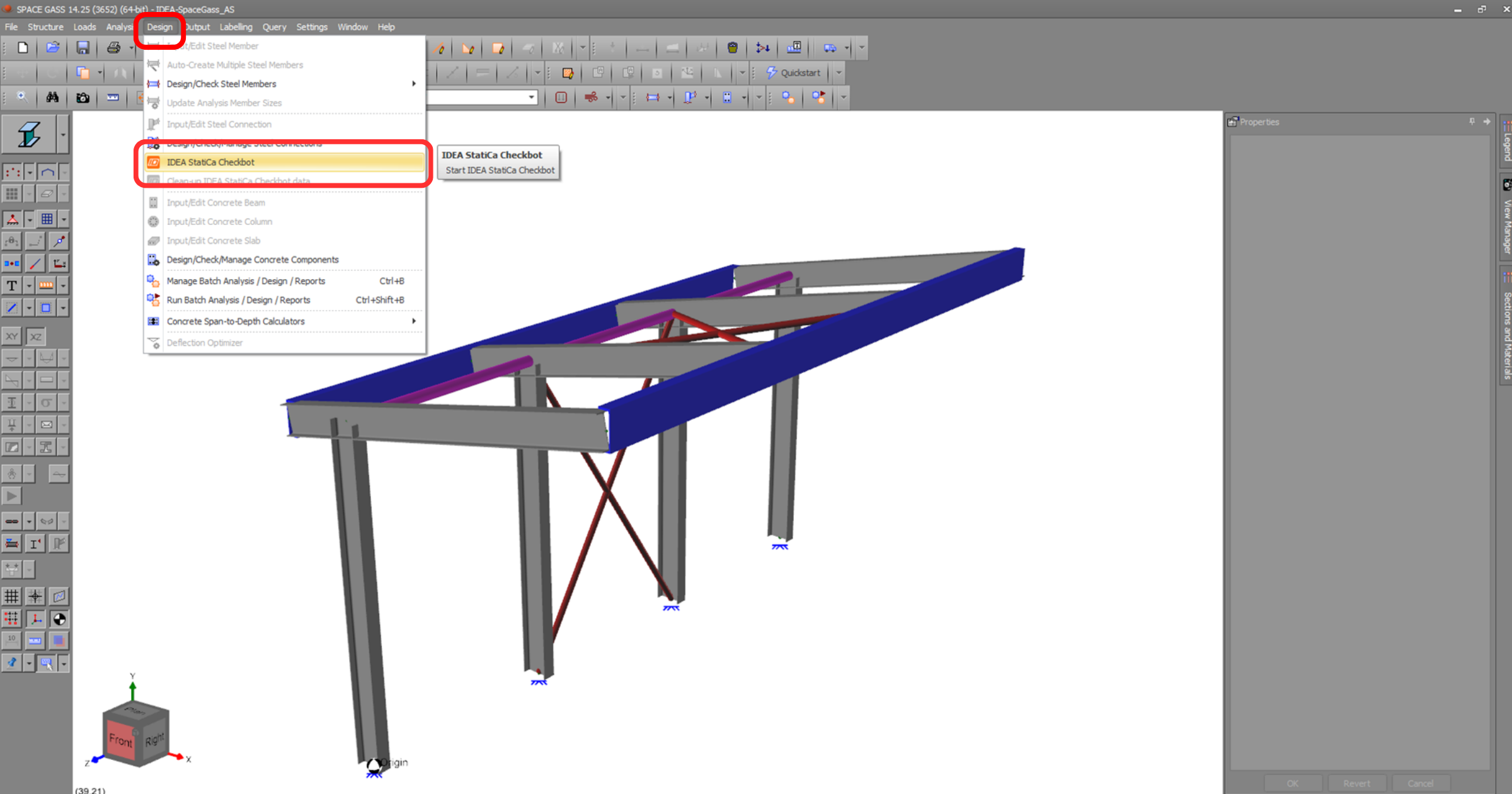
Il collegamento BIM dovrebbe essere integrato automaticamente. È possibile trovarlo nella barra multifunzione superiore sotto Progettazione -> IDEA StatiCa Checkbot. Si aprirà l'applicazione Checkbot .
Selezionare l'opzione Nuovo con tipo di progetto Acciaio, codice di progetto AS . Selezionare quindi Crea progetto.
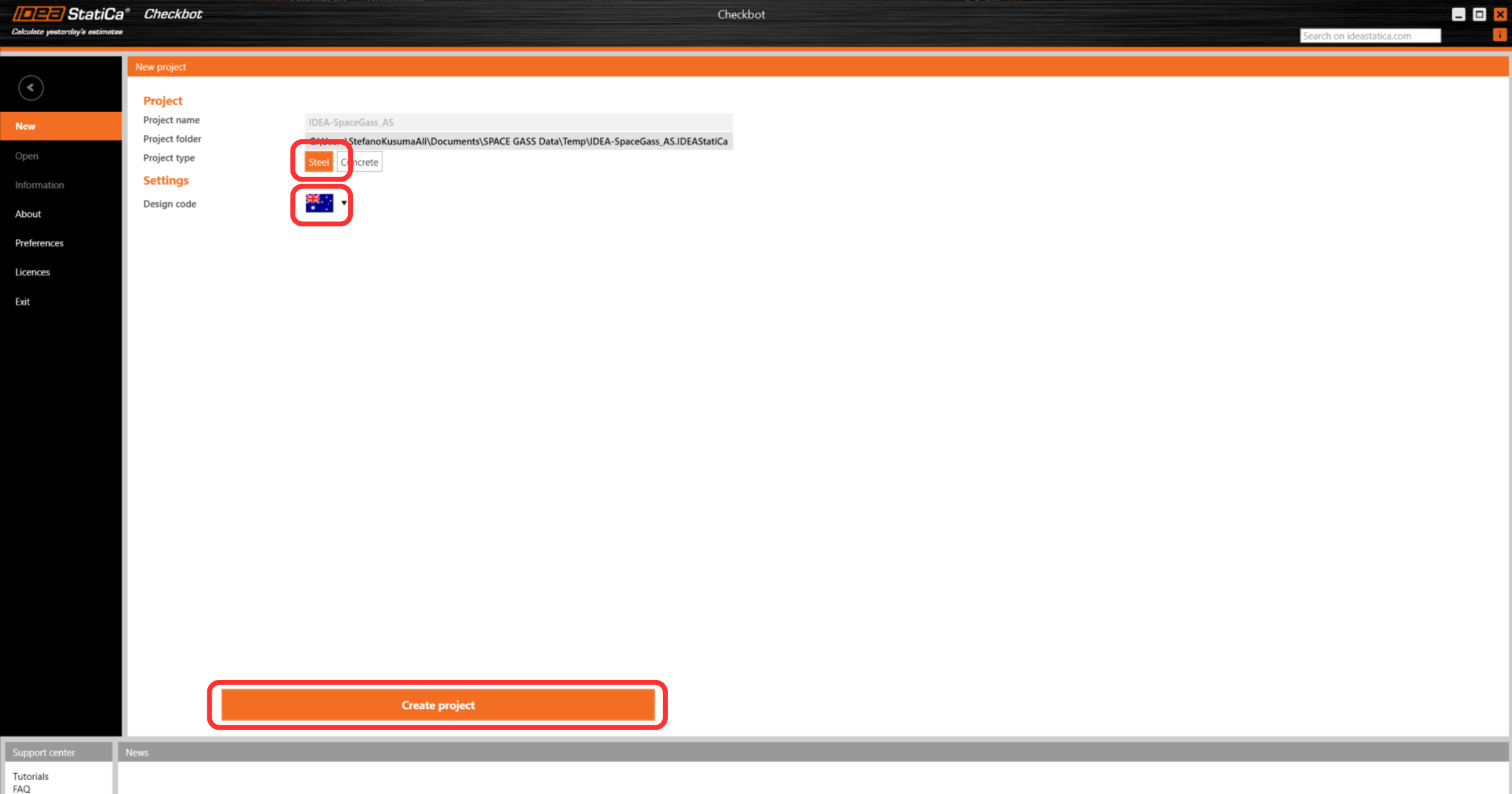
Il nuovo progetto Checkbot è pronto per importare le connessioni da Space Gass.
Widget #NaN: support_center_article
Name: Space Gass BIM Link tutorial - Import
ID: 3c0d291f-d5c1-4921-b00f-cc63a80a5e54
Show Raw Data
{
  "title": {
    "name": "Main headline (H1)",
    "type": "text",
    "value": "Importazione"
  },
  "preview_image": {
    "name": "Preview image",
    "type": "asset",
    "value": []
  },
  "post_date": {
    "name": "Post date",
    "type": "date_time",
    "value": null,
    "displayTimeZone": null
  },
  "perex_content": {
    "name": "Lead paragraph",
    "type": "text",
    "value": ""
  },
  "content": {
    "images": [
      {
        "description": null,
        "imageId": "248ab3e3-6162-4911-a526-f5e2ad0f1de1",
        "url": "https://assets-us-01.kc-usercontent.com:443/28eac049-c8ed-00e2-220c-12142a968dff/8ea4aa85-3e45-4625-914d-dbc05a226152/Untitled%20design%20%282%29.png",
        "height": 1260,
        "width": 2400
      },
      {
        "description": null,
        "imageId": "7afcf50d-857a-4af5-8fa3-57cd8cc9f558",
        "url": "https://assets-us-01.kc-usercontent.com:443/28eac049-c8ed-00e2-220c-12142a968dff/8e621456-5599-4b07-a940-e1da5e9c7747/Untitled%20design%20%283%29.png",
        "height": 1260,
        "width": 2400
      },
      {
        "description": null,
        "imageId": "ff71a91d-a82a-44ea-bb29-46931d0fc04d",
        "url": "https://assets-us-01.kc-usercontent.com:443/28eac049-c8ed-00e2-220c-12142a968dff/7768ccfc-ff86-4410-a2db-c8b7e0f37d15/Untitled%20design%20%284%29.png",
        "height": 1260,
        "width": 2400
      },
      {
        "description": null,
        "imageId": "fff12110-f591-4ce7-b0f8-add2ae91e0e3",
        "url": "https://assets-us-01.kc-usercontent.com:443/28eac049-c8ed-00e2-220c-12142a968dff/e737caee-cba1-4079-ac58-0a238266183f/Untitled%20design%20%285%29.png",
        "height": 1260,
        "width": 2400
      }
    ],
    "linkedItemCodenames": [],
    "linkedItems": [],
    "links": [],
    "name": "Content",
    "type": "rich_text",
    "value": "<p>In Checkbot selezionare <strong>Connessioni.</strong></p>\n<figure data-asset-id=\"248ab3e3-6162-4911-a526-f5e2ad0f1de1\" data-image-id=\"248ab3e3-6162-4911-a526-f5e2ad0f1de1\"><img src=\"https://assets-us-01.kc-usercontent.com:443/28eac049-c8ed-00e2-220c-12142a968dff/8ea4aa85-3e45-4625-914d-dbc05a226152/Untitled%20design%20%282%29.png\" data-asset-id=\"248ab3e3-6162-4911-a526-f5e2ad0f1de1\" data-image-id=\"248ab3e3-6162-4911-a526-f5e2ad0f1de1\" alt=\"\"></figure>\n<p>Quindi, in Space Gass, selezionare uno dei nodi più bassi delle colonne interne, quindi <strong>fare clic con il pulsante destro del mouse</strong> e selezionare <strong>OK.</strong></p>\n<figure data-asset-id=\"7afcf50d-857a-4af5-8fa3-57cd8cc9f558\" data-image-id=\"7afcf50d-857a-4af5-8fa3-57cd8cc9f558\"><img src=\"https://assets-us-01.kc-usercontent.com:443/28eac049-c8ed-00e2-220c-12142a968dff/8e621456-5599-4b07-a940-e1da5e9c7747/Untitled%20design%20%283%29.png\" data-asset-id=\"7afcf50d-857a-4af5-8fa3-57cd8cc9f558\" data-image-id=\"7afcf50d-857a-4af5-8fa3-57cd8cc9f558\" alt=\"\"></figure>\n<p>In questo modo la colonna e i suoi effetti di carico verranno importati in Checkbot, con le stesse coordinate, orientamenti e dimensioni di sezione del modello FEA/BIM.</p>\n<p>Si noti che la numerazione dei nodi e dei membri potrebbe essere diversa.</p>\n<figure data-asset-id=\"ff71a91d-a82a-44ea-bb29-46931d0fc04d\" data-image-id=\"ff71a91d-a82a-44ea-bb29-46931d0fc04d\"><img src=\"https://assets-us-01.kc-usercontent.com:443/28eac049-c8ed-00e2-220c-12142a968dff/7768ccfc-ff86-4410-a2db-c8b7e0f37d15/Untitled%20design%20%284%29.png\" data-asset-id=\"ff71a91d-a82a-44ea-bb29-46931d0fc04d\" data-image-id=\"ff71a91d-a82a-44ea-bb29-46931d0fc04d\" alt=\"\"></figure>\n<p>Si noti che l'area di lavoro 3D è progettata per mostrare una panoramica della struttura importata e non una vista dettagliata delle connessioni effettive.</p>\n<p>Per ulteriori informazioni su Checkbot, vedere <a href=\"https://www.ideastatica.com/support-center/checkbot-bulk-bim-workflows\" title=\"Checkbot\">qui</a>.</p>\n<p>Per diverse soluzioni FEA/BIM, è possibile importare in Checkbot anche connessioni multiple nello stesso modo di cui sopra. Invece di selezionare un nodo e i membri collegati, è possibile selezionare più nodi e membri utilizzando i metodi di selezione dell'applicazione.</p>\n<figure data-asset-id=\"fff12110-f591-4ce7-b0f8-add2ae91e0e3\" data-image-id=\"fff12110-f591-4ce7-b0f8-add2ae91e0e3\"><img src=\"https://assets-us-01.kc-usercontent.com:443/28eac049-c8ed-00e2-220c-12142a968dff/e737caee-cba1-4079-ac58-0a238266183f/Untitled%20design%20%285%29.png\" data-asset-id=\"fff12110-f591-4ce7-b0f8-add2ae91e0e3\" data-image-id=\"fff12110-f591-4ce7-b0f8-add2ae91e0e3\" alt=\"\"></figure>\n<p>Si consiglia di <em>non</em> importare tutte le connessioni contemporaneamente, ma di creare le connessioni in modo incrementale.</p>"
  },
  "regions": {
    "name": "Region",
    "type": "taxonomy",
    "value": [
      {
        "name": "EMEA",
        "codename": "emea"
      },
      {
        "name": "AMER",
        "codename": "amer"
      },
      {
        "name": "APAC",
        "codename": "apac"
      }
    ],
    "taxonomyGroup": "region"
  },
  "product_groups": {
    "name": "Product group",
    "type": "taxonomy",
    "value": [
      {
        "name": "Connection design",
        "codename": "connection_design"
      },
      {
        "name": "Steel",
        "codename": "steel"
      }
    ],
    "taxonomyGroup": "product_group"
  },
  "support_center_article_types": {
    "name": "Support center article",
    "type": "taxonomy",
    "value": [
      {
        "name": "Knowledge base",
        "codename": "knowledgebase_article"
      }
    ],
    "taxonomyGroup": "support_center_article"
  },
  "expertise_levels": {
    "name": "Expertise level",
    "type": "taxonomy",
    "value": [
      {
        "name": "Beginner",
        "codename": "beginner"
      },
      {
        "name": "Intermediate",
        "codename": "intermediate"
      }
    ],
    "taxonomyGroup": "expertise_level"
  },
  "labels": {
    "name": "Labels",
    "type": "taxonomy",
    "value": [
      {
        "name": "Connection",
        "codename": "connection"
      },
      {
        "name": "Checkbot",
        "codename": "checkbot"
      },
      {
        "name": "EN (Eurocode)",
        "codename": "eurocode"
      },
      {
        "name": "BIM link",
        "codename": "bim_links"
      },
      {
        "name": "AISC (USA)",
        "codename": "aisc"
      }
    ],
    "taxonomyGroup": "labels"
  },
  "linked_items": {
    "name": "Linked items",
    "type": "modular_content",
    "value": [],
    "linkedItems": []
  },
  "attachments__files": {
    "name": "Attachments",
    "type": "asset",
    "value": []
  },
  "content_priority__value": {
    "name": "Content priority value",
    "type": "number",
    "value": null
  },
  "options": {
    "name": "Options",
    "type": "multiple_choice",
    "value": []
  },
  "url_slug": {
    "name": "Url slug",
    "type": "url_slug",
    "value": "importazione"
  },
  "unique_url_slug": {
    "name": "Unique URL slug",
    "type": "custom",
    "value": "[\"import\",\"[autogenerated]\"]"
  },
  "content_settings__sitemap": {
    "name": "Show in sitemap",
    "type": "multiple_choice",
    "value": [
      {
        "name": "default",
        "codename": "default"
      }
    ]
  },
  "content_settings__robots": {
    "name": "Search engine indexing",
    "type": "multiple_choice",
    "value": [
      {
        "name": "default",
        "codename": "default"
      }
    ]
  },
  "content_settings__is_hidden": {
    "name": "Hidden nested content",
    "type": "multiple_choice",
    "value": [
      {
        "name": "yes",
        "codename": "yes"
      }
    ]
  },
  "content_settings__is_topped": {
    "name": "Topped",
    "type": "multiple_choice",
    "value": []
  },
  "metadata__page_title": {
    "name": "Page title",
    "type": "text",
    "value": "Importazione di una connessione in acciaio da FEA/CAD a Checkbot"
  },
  "metadata__page_description": {
    "name": "Page description",
    "type": "text",
    "value": "Tutorial IDEA StatiCa passo-passo per l'importazione di connessioni in acciaio e dei relativi effetti di carico da FEA/CAD a Checkbot. Progettazione strutturale di connessioni in acciaio saldate e bullonate."
  },
  "metadata__page_keywords": {
    "name": "Page keywords",
    "type": "text",
    "value": ""
  },
  "metadata__canonical_url": {
    "name": "Canonical URL",
    "type": "text",
    "value": ""
  },
  "metadata__og_title": {
    "name": "OG:title",
    "type": "text",
    "value": ""
  },
  "metadata__og_description": {
    "name": "OG:description",
    "type": "text",
    "value": ""
  },
  "metadata__og_image": {
    "name": "OG:image",
    "type": "asset",
    "value": []
  },
  "translation__translation_connector": {
    "name": "Translation Connector",
    "type": "taxonomy",
    "value": [],
    "taxonomyGroup": "languages"
  },
  "translation__force_translation": {
    "name": "Force translation",
    "type": "multiple_choice",
    "value": []
  },
  "translation__last_translation": {
    "images": [],
    "linkedItemCodenames": [],
    "linkedItems": [],
    "links": [],
    "name": "Last translation",
    "type": "rich_text",
    "value": "<p><br></p>"
  },
  "translation__ai_translated": {
    "name": "AI translated",
    "type": "multiple_choice",
    "value": []
  },
  "page_tree_settings__page_label": {
    "name": "Page label",
    "type": "text",
    "value": ""
  },
  "page_tree_settings__path_segment": {
    "name": "Path segment",
    "type": "text",
    "value": "import-bim"
  },
  "page_tree_settings__breadcrumb_style": {
    "name": "Breadcrumb style",
    "type": "multiple_choice",
    "value": []
  },
  "page_tree_settings__hide_in_breadcrumbs": {
    "name": "Hide in breadcrumbs",
    "type": "multiple_choice",
    "value": []
  }
}
Widget #NaN: support_center_article
Name: Space Gass BIM Link tutorial - Geometry
ID: 77f01373-3ca1-4771-92a6-836f404d5c70
Show Raw Data
{
  "title": {
    "name": "Main headline (H1)",
    "type": "text",
    "value": "Geometria"
  },
  "preview_image": {
    "name": "Preview image",
    "type": "asset",
    "value": []
  },
  "post_date": {
    "name": "Post date",
    "type": "date_time",
    "value": null,
    "displayTimeZone": null
  },
  "perex_content": {
    "name": "Lead paragraph",
    "type": "text",
    "value": ""
  },
  "content": {
    "images": [
      {
        "description": null,
        "imageId": "4e2335d7-da9c-4d5b-92e0-e408660a2b0a",
        "url": "https://assets-us-01.kc-usercontent.com:443/28eac049-c8ed-00e2-220c-12142a968dff/951cc7d5-0bcb-4f3a-9d44-672ef835afb1/Untitled%20design%20%2821%29.png",
        "height": 1890,
        "width": 3600
      },
      {
        "description": null,
        "imageId": "2bdaf7ab-a295-429f-a67d-b5ff2c574472",
        "url": "https://assets-us-01.kc-usercontent.com:443/28eac049-c8ed-00e2-220c-12142a968dff/68991ace-7bb9-40d6-9a24-814f314ac830/Untitled%20design.png",
        "height": 1260,
        "width": 2400
      }
    ],
    "linkedItemCodenames": [],
    "linkedItems": [],
    "links": [],
    "name": "Content",
    "type": "rich_text",
    "value": "<p>Nell'elenco degli elementi del progetto sotto Connessioni e con una connessione evidenziata in Checkbot, è possibile fare clic con il tasto destro del mouse e selezionare <strong>Apri </strong>o fare clic sul comando della barra multifunzione <strong>Apri</strong> per avviare la progettazione, la verifica del codice e la creazione di rapporti.</p>\n<figure data-asset-id=\"4e2335d7-da9c-4d5b-92e0-e408660a2b0a\" data-image-id=\"4e2335d7-da9c-4d5b-92e0-e408660a2b0a\"><img src=\"https://assets-us-01.kc-usercontent.com:443/28eac049-c8ed-00e2-220c-12142a968dff/951cc7d5-0bcb-4f3a-9d44-672ef835afb1/Untitled%20design%20%2821%29.png\" data-asset-id=\"4e2335d7-da9c-4d5b-92e0-e408660a2b0a\" data-image-id=\"4e2335d7-da9c-4d5b-92e0-e408660a2b0a\" alt=\"\"></figure>\n<p>Le impostazioni dei membri sono tratte dall'applicazione FEA/BIM originale. È tuttavia possibile modificare le dimensioni della sezione di qualsiasi membro nella schermata principale di Checkbot, ma ciò interromperà il collegamento con l'applicazione FEA/BIM in questa sessione, a meno che non venga nuovamente sincronizzato.</p>\n<p>La connessione importata viene aperta nell'applicazione IDEA StatiCa Connection.</p>\n<figure data-asset-id=\"2bdaf7ab-a295-429f-a67d-b5ff2c574472\" data-image-id=\"2bdaf7ab-a295-429f-a67d-b5ff2c574472\"><img src=\"https://assets-us-01.kc-usercontent.com:443/28eac049-c8ed-00e2-220c-12142a968dff/68991ace-7bb9-40d6-9a24-814f314ac830/Untitled%20design.png\" data-asset-id=\"2bdaf7ab-a295-429f-a67d-b5ff2c574472\" data-image-id=\"2bdaf7ab-a295-429f-a67d-b5ff2c574472\" alt=\"\"></figure>\n<p>È possibile che la soluzione FEA/BIM* preferita non mostri alcun effetto di carico o ne mostri di diversi, a seconda di come sono state definite le combinazioni di casi di carico. Per impostazione predefinita, IDEA StatiCa sceglierà i più critici ai fini della verifica del codice. (* Alcune soluzioni BIM non sono in grado di memorizzare i risultati delle combinazioni di casi di carico).</p>\n<p>Per ulteriori informazioni sugli effetti di carico, vedere <a href=\"https://www.ideastatica.com/support-center/checkbot-bulk-bim-workflows\" title=\"Checkbot\">qui</a>.</p>"
  },
  "regions": {
    "name": "Region",
    "type": "taxonomy",
    "value": [
      {
        "name": "EMEA",
        "codename": "emea"
      },
      {
        "name": "AMER",
        "codename": "amer"
      },
      {
        "name": "APAC",
        "codename": "apac"
      }
    ],
    "taxonomyGroup": "region"
  },
  "product_groups": {
    "name": "Product group",
    "type": "taxonomy",
    "value": [
      {
        "name": "Connection design",
        "codename": "connection_design"
      },
      {
        "name": "Steel",
        "codename": "steel"
      }
    ],
    "taxonomyGroup": "product_group"
  },
  "support_center_article_types": {
    "name": "Support center article",
    "type": "taxonomy",
    "value": [
      {
        "name": "Knowledge base",
        "codename": "knowledgebase_article"
      }
    ],
    "taxonomyGroup": "support_center_article"
  },
  "expertise_levels": {
    "name": "Expertise level",
    "type": "taxonomy",
    "value": [
      {
        "name": "Beginner",
        "codename": "beginner"
      },
      {
        "name": "Intermediate",
        "codename": "intermediate"
      }
    ],
    "taxonomyGroup": "expertise_level"
  },
  "labels": {
    "name": "Labels",
    "type": "taxonomy",
    "value": [
      {
        "name": "Connection",
        "codename": "connection"
      },
      {
        "name": "EN (Eurocode)",
        "codename": "eurocode"
      },
      {
        "name": "AISC (USA)",
        "codename": "aisc"
      },
      {
        "name": "BIM link",
        "codename": "bim_links"
      },
      {
        "name": "Checkbot",
        "codename": "checkbot"
      }
    ],
    "taxonomyGroup": "labels"
  },
  "linked_items": {
    "name": "Linked items",
    "type": "modular_content",
    "value": [],
    "linkedItems": []
  },
  "attachments__files": {
    "name": "Attachments",
    "type": "asset",
    "value": []
  },
  "content_priority__value": {
    "name": "Content priority value",
    "type": "number",
    "value": null
  },
  "options": {
    "name": "Options",
    "type": "multiple_choice",
    "value": []
  },
  "url_slug": {
    "name": "Url slug",
    "type": "url_slug",
    "value": "geometria"
  },
  "unique_url_slug": {
    "name": "Unique URL slug",
    "type": "custom",
    "value": "[\"geometry\",\"[autogenerated]\"]"
  },
  "content_settings__sitemap": {
    "name": "Show in sitemap",
    "type": "multiple_choice",
    "value": [
      {
        "name": "default",
        "codename": "default"
      }
    ]
  },
  "content_settings__robots": {
    "name": "Search engine indexing",
    "type": "multiple_choice",
    "value": [
      {
        "name": "default",
        "codename": "default"
      }
    ]
  },
  "content_settings__is_hidden": {
    "name": "Hidden nested content",
    "type": "multiple_choice",
    "value": [
      {
        "name": "yes",
        "codename": "yes"
      }
    ]
  },
  "content_settings__is_topped": {
    "name": "Topped",
    "type": "multiple_choice",
    "value": []
  },
  "metadata__page_title": {
    "name": "Page title",
    "type": "text",
    "value": "Importazione di una connessione in acciaio da FEA/CAD in Checkbot"
  },
  "metadata__page_description": {
    "name": "Page description",
    "type": "text",
    "value": "Tutorial IDEA StatiCa passo-passo per l'importazione di connessioni in acciaio e dei relativi effetti di carico da FEA/CAD a Checkbot. Progettazione strutturale di connessioni in acciaio saldate e bullonate."
  },
  "metadata__page_keywords": {
    "name": "Page keywords",
    "type": "text",
    "value": ""
  },
  "metadata__canonical_url": {
    "name": "Canonical URL",
    "type": "text",
    "value": ""
  },
  "metadata__og_title": {
    "name": "OG:title",
    "type": "text",
    "value": ""
  },
  "metadata__og_description": {
    "name": "OG:description",
    "type": "text",
    "value": ""
  },
  "metadata__og_image": {
    "name": "OG:image",
    "type": "asset",
    "value": []
  },
  "translation__translation_connector": {
    "name": "Translation Connector",
    "type": "taxonomy",
    "value": [],
    "taxonomyGroup": "languages"
  },
  "translation__force_translation": {
    "name": "Force translation",
    "type": "multiple_choice",
    "value": []
  },
  "translation__last_translation": {
    "images": [],
    "linkedItemCodenames": [],
    "linkedItems": [],
    "links": [],
    "name": "Last translation",
    "type": "rich_text",
    "value": "<p><br></p>"
  },
  "translation__ai_translated": {
    "name": "AI translated",
    "type": "multiple_choice",
    "value": []
  },
  "page_tree_settings__page_label": {
    "name": "Page label",
    "type": "text",
    "value": ""
  },
  "page_tree_settings__path_segment": {
    "name": "Path segment",
    "type": "text",
    "value": "geometry-bim"
  },
  "page_tree_settings__breadcrumb_style": {
    "name": "Breadcrumb style",
    "type": "multiple_choice",
    "value": []
  },
  "page_tree_settings__hide_in_breadcrumbs": {
    "name": "Hide in breadcrumbs",
    "type": "multiple_choice",
    "value": []
  }
}
Widget #NaN: support_center_article
Name: Space Gass BIM Link tutorial - Design Example (AS)
ID: 8b91404f-4265-4a2b-81da-612385ab03c7
Show Raw Data
{
  "title": {
    "name": "Main headline (H1)",
    "type": "text",
    "value": "Progetto"
  },
  "preview_image": {
    "name": "Preview image",
    "type": "asset",
    "value": []
  },
  "post_date": {
    "name": "Post date",
    "type": "date_time",
    "value": null,
    "displayTimeZone": null
  },
  "perex_content": {
    "name": "Lead paragraph",
    "type": "text",
    "value": ""
  },
  "content": {
    "images": [
      {
        "description": null,
        "imageId": "2b859eb0-7673-48f2-8840-8211521ded76",
        "url": "https://assets-us-01.kc-usercontent.com:443/28eac049-c8ed-00e2-220c-12142a968dff/152ce133-a458-42fe-a09b-b8e99246e8e8/Untitled%20design%20%281%29.png",
        "height": 1260,
        "width": 2400
      },
      {
        "description": null,
        "imageId": "690fd686-9e66-495f-9fc6-4953cc9e3778",
        "url": "https://assets-us-01.kc-usercontent.com:443/28eac049-c8ed-00e2-220c-12142a968dff/2213a4cf-0798-40fd-9ad4-3566d688fc42/Untitled%20design%20%2822%29.png",
        "height": 1890,
        "width": 3600
      },
      {
        "description": null,
        "imageId": "0c58a06c-a1f1-4b33-aa16-58e7cdd860db",
        "url": "https://assets-us-01.kc-usercontent.com:443/28eac049-c8ed-00e2-220c-12142a968dff/aa02ce6d-498a-47a6-9fd1-60e82e90dc59/Untitled%20design%20%2825%29.png",
        "height": 1890,
        "width": 3600
      },
      {
        "description": null,
        "imageId": "215e1e64-8cbd-4001-bb62-4cc71ab4d3a9",
        "url": "https://assets-us-01.kc-usercontent.com:443/28eac049-c8ed-00e2-220c-12142a968dff/1284b853-994f-4b3c-8b6b-d53c3581ad84/Untitled%20design%20%2826%29.png",
        "height": 1890,
        "width": 3600
      },
      {
        "description": null,
        "imageId": "4bcc4c95-cae9-4ab6-9ba0-95987cb5f25a",
        "url": "https://assets-us-01.kc-usercontent.com:443/28eac049-c8ed-00e2-220c-12142a968dff/9b2a5e0f-0818-4d88-aae5-44e44962b540/Untitled%20design%20%288%29.png",
        "height": 1260,
        "width": 2400
      },
      {
        "description": null,
        "imageId": "21f9d0d3-59e2-4f56-93a4-9935140d2166",
        "url": "https://assets-us-01.kc-usercontent.com:443/28eac049-c8ed-00e2-220c-12142a968dff/70448fad-0b80-4c8b-852f-01499fb18ba9/Untitled%20design%20%286%29.png",
        "height": 1260,
        "width": 2400
      },
      {
        "description": null,
        "imageId": "ffafd730-3508-4633-be2f-fe36cbe50ed5",
        "url": "https://assets-us-01.kc-usercontent.com:443/28eac049-c8ed-00e2-220c-12142a968dff/b5b15e22-47fc-420a-aa5b-068c5fcd20ff/Untitled%20design%20%287%29.png",
        "height": 1260,
        "width": 2400
      },
      {
        "description": null,
        "imageId": "2ae21d48-b47e-4a7b-a3f8-1fd429b463f8",
        "url": "https://assets-us-01.kc-usercontent.com:443/28eac049-c8ed-00e2-220c-12142a968dff/a7e37b83-91a4-4b0b-9d61-b6fcccc1b9c4/Untitled%20design%20%2824%29.png",
        "height": 1890,
        "width": 3600
      },
      {
        "description": null,
        "imageId": "44afbb4c-a96d-439f-aeff-666acde3983b",
        "url": "https://assets-us-01.kc-usercontent.com:443/28eac049-c8ed-00e2-220c-12142a968dff/b379e7fa-e893-47fb-a314-30f58cf2abf8/Untitled%20design%20%2827%29.png",
        "height": 1890,
        "width": 3600
      },
      {
        "description": null,
        "imageId": "a179a00d-5459-4eee-a4d1-542f99c1bab1",
        "url": "https://assets-us-01.kc-usercontent.com:443/28eac049-c8ed-00e2-220c-12142a968dff/ecff57a8-6eef-4d7b-aa27-e6c88aa4fcce/Untitled%20design%20%2818%29.png",
        "height": 1260,
        "width": 2400
      },
      {
        "description": null,
        "imageId": "15e0d104-52cc-4ad0-a643-1cf2185a7bbe",
        "url": "https://assets-us-01.kc-usercontent.com:443/28eac049-c8ed-00e2-220c-12142a968dff/f593955a-d417-4aac-9590-dd745b717d7f/Untitled%20design%20%2812%29.png",
        "height": 1260,
        "width": 2400
      },
      {
        "description": null,
        "imageId": "c4a4d2fb-fcaf-40c5-8cb0-314bbaded453",
        "url": "https://assets-us-01.kc-usercontent.com:443/28eac049-c8ed-00e2-220c-12142a968dff/20365ec1-9ea9-4e2f-afd3-32f62c4809c5/Untitled%20design%20%2813%29.png",
        "height": 1260,
        "width": 2400
      },
      {
        "description": null,
        "imageId": "89f066ac-5812-4b70-b728-e928978fb9f5",
        "url": "https://assets-us-01.kc-usercontent.com:443/28eac049-c8ed-00e2-220c-12142a968dff/391ad0fb-96fb-407b-8a63-59cc030ac264/report%20picture.png",
        "height": 900,
        "width": 1920
      },
      {
        "description": null,
        "imageId": "fa97b02c-f0e7-4670-850d-3e802dc9daa6",
        "url": "https://assets-us-01.kc-usercontent.com:443/28eac049-c8ed-00e2-220c-12142a968dff/eb5f6f15-6ce8-414f-9e08-25997666ddba/Untitled%20design%20%2814%29.png",
        "height": 1260,
        "width": 2400
      },
      {
        "description": null,
        "imageId": "49afcc11-b92f-47ca-b747-3c2022bd1bb1",
        "url": "https://assets-us-01.kc-usercontent.com:443/28eac049-c8ed-00e2-220c-12142a968dff/dafaa127-242f-4424-b229-e7f984d4a9a7/Untitled%20design%20%2815%29.png",
        "height": 1260,
        "width": 2400
      },
      {
        "description": null,
        "imageId": "efea58e6-fb20-46ce-aef0-366289de49f9",
        "url": "https://assets-us-01.kc-usercontent.com:443/28eac049-c8ed-00e2-220c-12142a968dff/40b8ad86-d22d-4456-9279-f334085c6d01/Design1-1A.png",
        "height": 792,
        "width": 824
      }
    ],
    "linkedItemCodenames": [],
    "linkedItems": [],
    "links": [
      {
        "codename": "rn_23_1__connection_library___the_largest_database",
        "linkId": "37fb73bf-dfd3-46d7-ae57-ee0e9c4cdb75",
        "urlSlug": "connection-library-il-piu-grande-database-di-connessioni-in-acciaio-scaricabili",
        "type": "support_center_article"
      },
      {
        "codename": "landing_page___steel_verification",
        "linkId": "06158daa-1491-4e83-ac34-4964bd5a3c63",
        "urlSlug": "verifiche-dell-acciaio",
        "type": "landing_page"
      },
      {
        "codename": "design_v2",
        "linkId": "b0a659df-8f92-4d1f-abb6-2efa02bad946",
        "urlSlug": "connection-design",
        "type": "landing_page"
      },
      {
        "codename": "how_to_export_report_to_ms_word__dxf_or_pdf_files",
        "linkId": "dfedaf85-c16f-5228-849c-0bfe09e9e8d1",
        "urlSlug": "come-creare-ed-esportare-un-report-in-file-ms-word-pdf-o-dxf",
        "type": "support_center_article"
      }
    ],
    "name": "Content",
    "type": "rich_text",
    "value": "<p>Per la diagonale si utilizzerà una <a href=\"https://www.ideastatica.com/support-center/how-to-model-one-bolt-connection\" title=\"Single bolt connections\">connessione a bullone singolo</a>. Per questo tipo di connessione, è necessario modificare il <strong>tipo di modello</strong> dell'elemento della controventatura in <strong>N-Vy-Vz</strong>. Selezionare la controventatura nell'elenco dei membri e modificare il tipo di modello nell'elenco a discesa.</p>\n<figure data-asset-id=\"2b859eb0-7673-48f2-8840-8211521ded76\" data-image-id=\"2b859eb0-7673-48f2-8840-8211521ded76\"><img src=\"https://assets-us-01.kc-usercontent.com:443/28eac049-c8ed-00e2-220c-12142a968dff/152ce133-a458-42fe-a09b-b8e99246e8e8/Untitled%20design%20%281%29.png\" data-asset-id=\"2b859eb0-7673-48f2-8840-8211521ded76\" data-image-id=\"2b859eb0-7673-48f2-8840-8211521ded76\" alt=\"\"></figure>\n<p>Utilizzeremo la Libreria connessioni per generare una connessione. Selezionate <strong>Proponi</strong> e IDEA StatiCa proporrà possibili soluzioni per la geometria corrente.</p>\n<figure data-asset-id=\"690fd686-9e66-495f-9fc6-4953cc9e3778\" data-image-id=\"690fd686-9e66-495f-9fc6-4953cc9e3778\"><img src=\"https://assets-us-01.kc-usercontent.com:443/28eac049-c8ed-00e2-220c-12142a968dff/2213a4cf-0798-40fd-9ad4-3566d688fc42/Untitled%20design%20%2822%29.png\" data-asset-id=\"690fd686-9e66-495f-9fc6-4953cc9e3778\" data-image-id=\"690fd686-9e66-495f-9fc6-4953cc9e3778\" alt=\"\"></figure>\n<p>La<a data-item-id=\"37fb73bf-dfd3-46d7-ae57-ee0e9c4cdb75\" href=\"\">Libreria connessioni</a> mostra le possibili soluzioni per la geometria corrente. Scegliere il modello proposto e premere <strong>OK</strong>.</p>\n<figure data-asset-id=\"0c58a06c-a1f1-4b33-aa16-58e7cdd860db\" data-image-id=\"0c58a06c-a1f1-4b33-aa16-58e7cdd860db\"><img src=\"https://assets-us-01.kc-usercontent.com:443/28eac049-c8ed-00e2-220c-12142a968dff/aa02ce6d-498a-47a6-9fd1-60e82e90dc59/Untitled%20design%20%2825%29.png\" data-asset-id=\"0c58a06c-a1f1-4b33-aa16-58e7cdd860db\" data-image-id=\"0c58a06c-a1f1-4b33-aa16-58e7cdd860db\" alt=\"\"></figure>\n<p>Accettare i valori proposti per i bulloni e il blocco di calcestruzzo e premere <strong>OK</strong>.</p>\n<figure data-asset-id=\"215e1e64-8cbd-4001-bb62-4cc71ab4d3a9\" data-image-id=\"215e1e64-8cbd-4001-bb62-4cc71ab4d3a9\"><img src=\"https://assets-us-01.kc-usercontent.com:443/28eac049-c8ed-00e2-220c-12142a968dff/1284b853-994f-4b3c-8b6b-d53c3581ad84/Untitled%20design%20%2826%29.png\" data-asset-id=\"215e1e64-8cbd-4001-bb62-4cc71ab4d3a9\" data-image-id=\"215e1e64-8cbd-4001-bb62-4cc71ab4d3a9\" alt=\"\"></figure>\n<p>Ecco come appare la connessione iniziale.</p>\n<figure data-asset-id=\"4bcc4c95-cae9-4ab6-9ba0-95987cb5f25a\" data-image-id=\"4bcc4c95-cae9-4ab6-9ba0-95987cb5f25a\"><img src=\"https://assets-us-01.kc-usercontent.com:443/28eac049-c8ed-00e2-220c-12142a968dff/9b2a5e0f-0818-4d88-aae5-44e44962b540/Untitled%20design%20%288%29.png\" data-asset-id=\"4bcc4c95-cae9-4ab6-9ba0-95987cb5f25a\" data-image-id=\"4bcc4c95-cae9-4ab6-9ba0-95987cb5f25a\" alt=\"\"></figure>\n<p>Con questi parametri predefiniti per la piastra di base.</p>\n<figure data-asset-id=\"21f9d0d3-59e2-4f56-93a4-9935140d2166\" data-image-id=\"21f9d0d3-59e2-4f56-93a4-9935140d2166\"><img src=\"https://assets-us-01.kc-usercontent.com:443/28eac049-c8ed-00e2-220c-12142a968dff/70448fad-0b80-4c8b-852f-01499fb18ba9/Untitled%20design%20%286%29.png\" data-asset-id=\"21f9d0d3-59e2-4f56-93a4-9935140d2166\" data-image-id=\"21f9d0d3-59e2-4f56-93a4-9935140d2166\" alt=\"\"></figure>\n<p>Questi sono i parametri per la piastra di connessione.</p>\n<figure data-asset-id=\"ffafd730-3508-4633-be2f-fe36cbe50ed5\" data-image-id=\"ffafd730-3508-4633-be2f-fe36cbe50ed5\"><img src=\"https://assets-us-01.kc-usercontent.com:443/28eac049-c8ed-00e2-220c-12142a968dff/b5b15e22-47fc-420a-aa5b-068c5fcd20ff/Untitled%20design%20%287%29.png\" data-asset-id=\"ffafd730-3508-4633-be2f-fe36cbe50ed5\" data-image-id=\"ffafd730-3508-4633-be2f-fe36cbe50ed5\" alt=\"\"></figure>\n<p>Questo completa il progetto della connessione per la piastra di base della colonna con un rinforzo diagonale.</p>\n<h2>Verifica secondo codice e relazione</h2>\n<p>Eseguite ora una verifica del codice utilizzando l'icona <strong>Calcola </strong>nel pannello <a data-item-id=\"06158daa-1491-4e83-ac34-4964bd5a3c63\" href=\"\">CBFEM</a> della barra multifunzione superiore.<br>\nIn <a data-item-id=\"b0a659df-8f92-4d1f-abb6-2efa02bad946\" href=\"\">IDEA StatiCa Connection</a> è possibile eseguire diversi tipi di analisi e verifiche del codice. Per ulteriori informazioni, consultate <a href=\"https://www.ideastatica.com/support-center/checkbot-bulk-bim-workflows\" data-new-window=\"true\" title=\"Checkbot\" target=\"_blank\" rel=\"noopener noreferrer\">qui</a>.</p>\n<figure data-asset-id=\"2ae21d48-b47e-4a7b-a3f8-1fd429b463f8\" data-image-id=\"2ae21d48-b47e-4a7b-a3f8-1fd429b463f8\"><img src=\"https://assets-us-01.kc-usercontent.com:443/28eac049-c8ed-00e2-220c-12142a968dff/a7e37b83-91a4-4b0b-9d61-b6fcccc1b9c4/Untitled%20design%20%2824%29.png\" data-asset-id=\"2ae21d48-b47e-4a7b-a3f8-1fd429b463f8\" data-image-id=\"2ae21d48-b47e-4a7b-a3f8-1fd429b463f8\" alt=\"\"></figure>\n<p>I risultati potrebbero non essere accettabili. In questo caso, gli ancoraggi falliscono a causa della loro bassa capacità di progetto.</p>\n<figure data-asset-id=\"44afbb4c-a96d-439f-aeff-666acde3983b\" data-image-id=\"44afbb4c-a96d-439f-aeff-666acde3983b\"><img src=\"https://assets-us-01.kc-usercontent.com:443/28eac049-c8ed-00e2-220c-12142a968dff/b379e7fa-e893-47fb-a314-30f58cf2abf8/Untitled%20design%20%2827%29.png\" data-asset-id=\"44afbb4c-a96d-439f-aeff-666acde3983b\" data-image-id=\"44afbb4c-a96d-439f-aeff-666acde3983b\" alt=\"\"></figure>\n<p>È possibile accedere alla scheda <strong>Verifica </strong>per rivedere i risultati e osservare più da vicino gli ancoraggi espandendo il calcolo con il simbolo<strong>'+</strong>'. Si può notare che gli ancoraggi cedono in tensione nel blocco di calcestruzzo.</p>\n<figure data-asset-id=\"a179a00d-5459-4eee-a4d1-542f99c1bab1\" data-image-id=\"a179a00d-5459-4eee-a4d1-542f99c1bab1\"><img src=\"https://assets-us-01.kc-usercontent.com:443/28eac049-c8ed-00e2-220c-12142a968dff/ecff57a8-6eef-4d7b-aa27-e6c88aa4fcce/Untitled%20design%20%2818%29.png\" data-asset-id=\"a179a00d-5459-4eee-a4d1-542f99c1bab1\" data-image-id=\"a179a00d-5459-4eee-a4d1-542f99c1bab1\" alt=\"\"></figure>\n<p>È necessario ottimizzare il progetto per trovare la soluzione di passaggio. Tornare alla scheda <strong>Progetto</strong>, evidenziare l'<strong>operazione piastra di base</strong> e modificare la <strong>lunghezza di ancoraggio</strong> in 200 mm e l'<strong>offset </strong>del blocco in calcestruzzo in 300 mm.</p>\n<figure data-asset-id=\"15e0d104-52cc-4ad0-a643-1cf2185a7bbe\" data-image-id=\"15e0d104-52cc-4ad0-a643-1cf2185a7bbe\"><img src=\"https://assets-us-01.kc-usercontent.com:443/28eac049-c8ed-00e2-220c-12142a968dff/f593955a-d417-4aac-9590-dd745b717d7f/Untitled%20design%20%2812%29.png\" data-asset-id=\"15e0d104-52cc-4ad0-a643-1cf2185a7bbe\" data-image-id=\"15e0d104-52cc-4ad0-a643-1cf2185a7bbe\" alt=\"\"></figure>\n<p>Eseguire nuovamente l'analisi e la verifica del codice.</p>\n<figure data-asset-id=\"c4a4d2fb-fcaf-40c5-8cb0-314bbaded453\" data-image-id=\"c4a4d2fb-fcaf-40c5-8cb0-314bbaded453\"><img src=\"https://assets-us-01.kc-usercontent.com:443/28eac049-c8ed-00e2-220c-12142a968dff/20365ec1-9ea9-4e2f-afd3-32f62c4809c5/Untitled%20design%20%2813%29.png\" data-asset-id=\"c4a4d2fb-fcaf-40c5-8cb0-314bbaded453\" data-image-id=\"c4a4d2fb-fcaf-40c5-8cb0-314bbaded453\" alt=\"\"></figure>\n<p>Una volta terminata la verifica del codice, nella scheda <strong>Report </strong>è possibile creare il report contenente i risultati e i diagrammi del modello di <a data-item-id=\"b0a659df-8f92-4d1f-abb6-2efa02bad946\" href=\"\">connessione</a>.</p>\n<p>Il report può essere stampato o salvato in diversi formati. Per ulteriori informazioni, vedere <a data-item-id=\"dfedaf85-c16f-5228-849c-0bfe09e9e8d1\" href=\"\">qui</a>.</p>\n<figure data-asset-id=\"89f066ac-5812-4b70-b728-e928978fb9f5\" data-image-id=\"89f066ac-5812-4b70-b728-e928978fb9f5\"><img src=\"https://assets-us-01.kc-usercontent.com:443/28eac049-c8ed-00e2-220c-12142a968dff/391ad0fb-96fb-407b-8a63-59cc030ac264/report%20picture.png\" data-asset-id=\"89f066ac-5812-4b70-b728-e928978fb9f5\" data-image-id=\"89f066ac-5812-4b70-b728-e928978fb9f5\" alt=\"\"></figure>\n<p><strong>Salvare </strong>e uscire da questa connessione per tornare a Checkbot.</p>\n<p>In Checkbot, si vedrà un segno di spunta verde accanto alla connessione. Ciò significa che la connessione è valida e ha superato tutti i controlli di codice. Nel pannello Connessione è possibile vedere anche una rappresentazione della connessione e un riepilogo dei risultati della verifica del codice.</p>\n<figure data-asset-id=\"fa97b02c-f0e7-4670-850d-3e802dc9daa6\" data-image-id=\"fa97b02c-f0e7-4670-850d-3e802dc9daa6\"><img src=\"https://assets-us-01.kc-usercontent.com:443/28eac049-c8ed-00e2-220c-12142a968dff/eb5f6f15-6ce8-414f-9e08-25997666ddba/Untitled%20design%20%2814%29.png\" data-asset-id=\"fa97b02c-f0e7-4670-850d-3e802dc9daa6\" data-image-id=\"fa97b02c-f0e7-4670-850d-3e802dc9daa6\" alt=\"\"></figure>\n<p>Se in Checkbot sono presenti più connessioni, ciascuna di esse deve essere aperta, progettata e sottoposta a verifica del codice.</p>\n<p>Nell'esempio seguente, si può notare che le connessioni della piastra di base hanno superato i rispettivi controlli del codice, mentre le altre connessioni devono ancora essere convalidate.</p>\n<figure data-asset-id=\"49afcc11-b92f-47ca-b747-3c2022bd1bb1\" data-image-id=\"49afcc11-b92f-47ca-b747-3c2022bd1bb1\"><img src=\"https://assets-us-01.kc-usercontent.com:443/28eac049-c8ed-00e2-220c-12142a968dff/dafaa127-242f-4424-b229-e7f984d4a9a7/Untitled%20design%20%2815%29.png\" data-asset-id=\"49afcc11-b92f-47ca-b747-3c2022bd1bb1\" data-image-id=\"49afcc11-b92f-47ca-b747-3c2022bd1bb1\" alt=\"\"></figure>\n<p>È possibile continuare con la progettazione di ulteriori connessioni: <a href=\"https://www.ideastatica.com/support-center/design-column-to-rafter-connection\" data-new-window=\"true\" title=\"Roof Connection\" target=\"_blank\" rel=\"noopener noreferrer\">vedere come modellare la connessione al tetto con le controventature</a>.</p>\n<figure data-asset-id=\"efea58e6-fb20-46ce-aef0-366289de49f9\" data-image-id=\"efea58e6-fb20-46ce-aef0-366289de49f9\"><img src=\"https://assets-us-01.kc-usercontent.com:443/28eac049-c8ed-00e2-220c-12142a968dff/40b8ad86-d22d-4456-9279-f334085c6d01/Design1-1A.png\" data-asset-id=\"efea58e6-fb20-46ce-aef0-366289de49f9\" data-image-id=\"efea58e6-fb20-46ce-aef0-366289de49f9\" alt=\"\"></figure>"
  },
  "regions": {
    "name": "Region",
    "type": "taxonomy",
    "value": [
      {
        "name": "EMEA",
        "codename": "emea"
      },
      {
        "name": "APAC",
        "codename": "apac"
      }
    ],
    "taxonomyGroup": "region"
  },
  "product_groups": {
    "name": "Product group",
    "type": "taxonomy",
    "value": [
      {
        "name": "Connection design",
        "codename": "connection_design"
      },
      {
        "name": "Steel",
        "codename": "steel"
      }
    ],
    "taxonomyGroup": "product_group"
  },
  "support_center_article_types": {
    "name": "Support center article",
    "type": "taxonomy",
    "value": [
      {
        "name": "Knowledge base",
        "codename": "knowledgebase_article"
      }
    ],
    "taxonomyGroup": "support_center_article"
  },
  "expertise_levels": {
    "name": "Expertise level",
    "type": "taxonomy",
    "value": [
      {
        "name": "Beginner",
        "codename": "beginner"
      },
      {
        "name": "Intermediate",
        "codename": "intermediate"
      }
    ],
    "taxonomyGroup": "expertise_level"
  },
  "labels": {
    "name": "Labels",
    "type": "taxonomy",
    "value": [
      {
        "name": "BIM link",
        "codename": "bim_links"
      }
    ],
    "taxonomyGroup": "labels"
  },
  "linked_items": {
    "name": "Linked items",
    "type": "modular_content",
    "value": [],
    "linkedItems": []
  },
  "attachments__files": {
    "name": "Attachments",
    "type": "asset",
    "value": []
  },
  "content_priority__value": {
    "name": "Content priority value",
    "type": "number",
    "value": null
  },
  "options": {
    "name": "Options",
    "type": "multiple_choice",
    "value": []
  },
  "url_slug": {
    "name": "Url slug",
    "type": "url_slug",
    "value": "progetto"
  },
  "unique_url_slug": {
    "name": "Unique URL slug",
    "type": "custom",
    "value": "[\"design\",\"[autogenerated]\"]"
  },
  "content_settings__sitemap": {
    "name": "Show in sitemap",
    "type": "multiple_choice",
    "value": [
      {
        "name": "default",
        "codename": "default"
      }
    ]
  },
  "content_settings__robots": {
    "name": "Search engine indexing",
    "type": "multiple_choice",
    "value": [
      {
        "name": "default",
        "codename": "default"
      }
    ]
  },
  "content_settings__is_hidden": {
    "name": "Hidden nested content",
    "type": "multiple_choice",
    "value": [
      {
        "name": "yes",
        "codename": "yes"
      }
    ]
  },
  "content_settings__is_topped": {
    "name": "Topped",
    "type": "multiple_choice",
    "value": []
  },
  "metadata__page_title": {
    "name": "Page title",
    "type": "text",
    "value": "Progettazione strutturale di connessioni bullonate"
  },
  "metadata__page_description": {
    "name": "Page description",
    "type": "text",
    "value": "IDEA StatiCa: tutorial passo-passo per la progettazione strutturale di connessioni bullonate nel software di analisi delle sollecitazioni."
  },
  "metadata__page_keywords": {
    "name": "Page keywords",
    "type": "text",
    "value": ""
  },
  "metadata__canonical_url": {
    "name": "Canonical URL",
    "type": "text",
    "value": ""
  },
  "metadata__og_title": {
    "name": "OG:title",
    "type": "text",
    "value": ""
  },
  "metadata__og_description": {
    "name": "OG:description",
    "type": "text",
    "value": ""
  },
  "metadata__og_image": {
    "name": "OG:image",
    "type": "asset",
    "value": []
  },
  "translation__translation_connector": {
    "name": "Translation Connector",
    "type": "taxonomy",
    "value": [],
    "taxonomyGroup": "languages"
  },
  "translation__force_translation": {
    "name": "Force translation",
    "type": "multiple_choice",
    "value": []
  },
  "translation__last_translation": {
    "images": [],
    "linkedItemCodenames": [],
    "linkedItems": [],
    "links": [],
    "name": "Last translation",
    "type": "rich_text",
    "value": "<p><br></p>"
  },
  "translation__ai_translated": {
    "name": "AI translated",
    "type": "multiple_choice",
    "value": []
  },
  "page_tree_settings__page_label": {
    "name": "Page label",
    "type": "text",
    "value": ""
  },
  "page_tree_settings__path_segment": {
    "name": "Path segment",
    "type": "text",
    "value": "design-bim-copy"
  },
  "page_tree_settings__breadcrumb_style": {
    "name": "Breadcrumb style",
    "type": "multiple_choice",
    "value": []
  },
  "page_tree_settings__hide_in_breadcrumbs": {
    "name": "Hide in breadcrumbs",
    "type": "multiple_choice",
    "value": []
  }
}
Widget #NaN: support_center_article
Name: General BIM Link connection tutorial - Synchronize model
ID: 69626664-8ef3-4051-80e0-33bc98c97204
Show Raw Data
{
  "title": {
    "name": "Main headline (H1)",
    "type": "text",
    "value": "Sincronizza le connessioni"
  },
  "preview_image": {
    "name": "Preview image",
    "type": "asset",
    "value": []
  },
  "post_date": {
    "name": "Post date",
    "type": "date_time",
    "value": null,
    "displayTimeZone": null
  },
  "perex_content": {
    "name": "Lead paragraph",
    "type": "text",
    "value": ""
  },
  "content": {
    "images": [
      {
        "description": null,
        "imageId": "06d20ca4-2fb6-4f94-882d-66634084d102",
        "url": "https://assets-us-01.kc-usercontent.com:443/28eac049-c8ed-00e2-220c-12142a968dff/ff009b18-fc87-4bf8-990c-1f3d5a554cd0/Synchronize1F.png",
        "height": 161,
        "width": 862
      },
      {
        "description": null,
        "imageId": "18a161cd-b9f4-4804-94c8-b0d5cd4daa30",
        "url": "https://assets-us-01.kc-usercontent.com:443/28eac049-c8ed-00e2-220c-12142a968dff/38ea9cc2-af57-4394-b1b7-35e74da0f274/Synchronize7E.png",
        "height": 572,
        "width": 699
      },
      {
        "description": null,
        "imageId": "2dd5ffd4-d30e-495b-aa0e-eba0cab6f5da",
        "url": "https://assets-us-01.kc-usercontent.com:443/28eac049-c8ed-00e2-220c-12142a968dff/f8ab1c63-2749-4070-b50f-074fca51f515/Synchronize7D.png",
        "height": 1164,
        "width": 1920
      },
      {
        "description": null,
        "imageId": "44bf104d-2a0e-46d2-bb11-31a35f37d1a7",
        "url": "https://assets-us-01.kc-usercontent.com:443/28eac049-c8ed-00e2-220c-12142a968dff/602d9426-058c-42e9-9b4a-979a30176f2f/Synchronize4B.png",
        "height": 202,
        "width": 331
      }
    ],
    "linkedItemCodenames": [],
    "linkedItems": [],
    "links": [],
    "name": "Content",
    "type": "rich_text",
    "value": "<p>A volte, ci vengono apportate modifiche al modello FEA/BIM, come dimensioni o carichi diversi oppure nella sezione della membratura. Queste modifiche possono essere sincronizzate tra Checkbot e modello FEA/BIM.</p>\n<p>Ci sono due possibili alternative:</p>\n<ul>\n  <li>Sincronizzare l'elemento corrente (se sono selezionati uno o più giunti)</li>\n  <li>Sincronizzare l'intero modello strutturale importato</li>\n</ul>\n<figure data-asset-id=\"06d20ca4-2fb6-4f94-882d-66634084d102\" data-image-id=\"06d20ca4-2fb6-4f94-882d-66634084d102\"><img src=\"https://assets-us-01.kc-usercontent.com:443/28eac049-c8ed-00e2-220c-12142a968dff/ff009b18-fc87-4bf8-990c-1f3d5a554cd0/Synchronize1F.png\" data-asset-id=\"06d20ca4-2fb6-4f94-882d-66634084d102\" data-image-id=\"06d20ca4-2fb6-4f94-882d-66634084d102\" alt=\"\"></figure>\n<p>Per testare questa funzionalità, è possibile modificare la dimensione o la forma di una sezione dell'elemento nell'applicazione FEA/BIM o modificare un caso o una combinazione di carico, ecc.: <strong>modifica le colonne in una sezione più piccola</strong>. Ricordati di <strong>ricalcolare il modello FEA.</strong></p>\n<figure data-asset-id=\"18a161cd-b9f4-4804-94c8-b0d5cd4daa30\" data-image-id=\"18a161cd-b9f4-4804-94c8-b0d5cd4daa30\"><img src=\"https://assets-us-01.kc-usercontent.com:443/28eac049-c8ed-00e2-220c-12142a968dff/38ea9cc2-af57-4394-b1b7-35e74da0f274/Synchronize7E.png\" data-asset-id=\"18a161cd-b9f4-4804-94c8-b0d5cd4daa30\" data-image-id=\"18a161cd-b9f4-4804-94c8-b0d5cd4daa30\" alt=\"\"></figure>\n<p>In Checkbot seleziona le connessioni progettate (potrebbero essercene più di una) e dal pannello <strong>Elemento corrente</strong> seleziona <strong>Sync </strong>per sincronizzare.</p>\n<p>Il progetto Checkbot verrà aggiornato, la progettazione della connessione verrà preservata, ma i risultati verranno invalidati. Puoi vedere che la colonna è ora aggiornata e corrispondente alla modifica nel modello FEA.</p>\n<figure data-asset-id=\"2dd5ffd4-d30e-495b-aa0e-eba0cab6f5da\" data-image-id=\"2dd5ffd4-d30e-495b-aa0e-eba0cab6f5da\"><img src=\"https://assets-us-01.kc-usercontent.com:443/28eac049-c8ed-00e2-220c-12142a968dff/f8ab1c63-2749-4070-b50f-074fca51f515/Synchronize7D.png\" data-asset-id=\"2dd5ffd4-d30e-495b-aa0e-eba0cab6f5da\" data-image-id=\"2dd5ffd4-d30e-495b-aa0e-eba0cab6f5da\" alt=\"\"></figure>\n<p>È sufficiente verificare nuovamente le connessioni evidenziate selezionando <strong>Calcola </strong>dal pannello <strong>Elemento corrente</strong>. Tieni presente che cambiamenti più importanti nel modello potrebbero richiedere ulteriori passaggi di convalida con le connessioni interessate (come sopra).</p>\n<figure data-asset-id=\"44bf104d-2a0e-46d2-bb11-31a35f37d1a7\" data-image-id=\"44bf104d-2a0e-46d2-bb11-31a35f37d1a7\"><img src=\"https://assets-us-01.kc-usercontent.com:443/28eac049-c8ed-00e2-220c-12142a968dff/602d9426-058c-42e9-9b4a-979a30176f2f/Synchronize4B.png\" data-asset-id=\"44bf104d-2a0e-46d2-bb11-31a35f37d1a7\" data-image-id=\"44bf104d-2a0e-46d2-bb11-31a35f37d1a7\" alt=\"\"></figure>\n<p>Se le connessioni non danno i risultati desiderati, è possibile riaprirle per ottimizzare la progettazione (ad esempio rafforzarle se non sono verificate o alleggerirle e ottimizzare i materiali se l'utilizzo è troppo basso).</p>"
  },
  "regions": {
    "name": "Region",
    "type": "taxonomy",
    "value": [
      {
        "name": "EMEA",
        "codename": "emea"
      },
      {
        "name": "AMER",
        "codename": "amer"
      },
      {
        "name": "APAC",
        "codename": "apac"
      }
    ],
    "taxonomyGroup": "region"
  },
  "product_groups": {
    "name": "Product group",
    "type": "taxonomy",
    "value": [
      {
        "name": "Connection design",
        "codename": "connection_design"
      },
      {
        "name": "Steel",
        "codename": "steel"
      }
    ],
    "taxonomyGroup": "product_group"
  },
  "support_center_article_types": {
    "name": "Support center article",
    "type": "taxonomy",
    "value": [
      {
        "name": "Knowledge base",
        "codename": "knowledgebase_article"
      }
    ],
    "taxonomyGroup": "support_center_article"
  },
  "expertise_levels": {
    "name": "Expertise level",
    "type": "taxonomy",
    "value": [
      {
        "name": "Beginner",
        "codename": "beginner"
      },
      {
        "name": "Intermediate",
        "codename": "intermediate"
      }
    ],
    "taxonomyGroup": "expertise_level"
  },
  "labels": {
    "name": "Labels",
    "type": "taxonomy",
    "value": [
      {
        "name": "Connection",
        "codename": "connection"
      },
      {
        "name": "Checkbot",
        "codename": "checkbot"
      }
    ],
    "taxonomyGroup": "labels"
  },
  "linked_items": {
    "name": "Linked items",
    "type": "modular_content",
    "value": [],
    "linkedItems": []
  },
  "attachments__files": {
    "name": "Attachments",
    "type": "asset",
    "value": []
  },
  "content_priority__value": {
    "name": "Content priority value",
    "type": "number",
    "value": null
  },
  "options": {
    "name": "Options",
    "type": "multiple_choice",
    "value": []
  },
  "url_slug": {
    "name": "Url slug",
    "type": "url_slug",
    "value": "sincronizza-le-connessioni"
  },
  "unique_url_slug": {
    "name": "Unique URL slug",
    "type": "custom",
    "value": "[\"synchronize-connections\",\"[autogenerated]\"]"
  },
  "content_settings__sitemap": {
    "name": "Show in sitemap",
    "type": "multiple_choice",
    "value": [
      {
        "name": "default",
        "codename": "default"
      }
    ]
  },
  "content_settings__robots": {
    "name": "Search engine indexing",
    "type": "multiple_choice",
    "value": [
      {
        "name": "default",
        "codename": "default"
      }
    ]
  },
  "content_settings__is_hidden": {
    "name": "Hidden nested content",
    "type": "multiple_choice",
    "value": [
      {
        "name": "yes",
        "codename": "yes"
      }
    ]
  },
  "content_settings__is_topped": {
    "name": "Topped",
    "type": "multiple_choice",
    "value": []
  },
  "metadata__page_title": {
    "name": "Page title",
    "type": "text",
    "value": "Steel connection model synchronizing between CAD/FEA and Checkbot"
  },
  "metadata__page_description": {
    "name": "Page description",
    "type": "text",
    "value": "IDEA Statica Step-by-step tutorial for synchronizing steel connection between FEA/CAD and Checkbot. Structural design of welded and bolted steel connections."
  },
  "metadata__page_keywords": {
    "name": "Page keywords",
    "type": "text",
    "value": ""
  },
  "metadata__canonical_url": {
    "name": "Canonical URL",
    "type": "text",
    "value": ""
  },
  "metadata__og_title": {
    "name": "OG:title",
    "type": "text",
    "value": ""
  },
  "metadata__og_description": {
    "name": "OG:description",
    "type": "text",
    "value": ""
  },
  "metadata__og_image": {
    "name": "OG:image",
    "type": "asset",
    "value": []
  },
  "translation__translation_connector": {
    "name": "Translation Connector",
    "type": "taxonomy",
    "value": [],
    "taxonomyGroup": "languages"
  },
  "translation__force_translation": {
    "name": "Force translation",
    "type": "multiple_choice",
    "value": []
  },
  "translation__last_translation": {
    "images": [],
    "linkedItemCodenames": [],
    "linkedItems": [],
    "links": [],
    "name": "Last translation",
    "type": "rich_text",
    "value": "<p><br></p>"
  },
  "translation__ai_translated": {
    "name": "AI translated",
    "type": "multiple_choice",
    "value": []
  },
  "page_tree_settings__page_label": {
    "name": "Page label",
    "type": "text",
    "value": ""
  },
  "page_tree_settings__path_segment": {
    "name": "Path segment",
    "type": "text",
    "value": ""
  },
  "page_tree_settings__breadcrumb_style": {
    "name": "Breadcrumb style",
    "type": "multiple_choice",
    "value": []
  },
  "page_tree_settings__hide_in_breadcrumbs": {
    "name": "Hide in breadcrumbs",
    "type": "multiple_choice",
    "value": []
  }
}
Space Gass è stato collegato con successo a IDEA StatiCa Connection tramite Checkbot.
Scopri come utilizzare IDEA StatiCa in modo efficace con i nostri corsi di e-learning di autoapprendimento
Inizia ad imparare


