Idea Statica
Steel
Concrete
BIM & Workflows
Support & Learning
Pricing
Company
14-Day Trial
Support CenterKnowledge BaseAdvanced imports of connectors from CAD tools
Advanced imports of connectors from CAD tools
SteelConnection designMember designKnowledge basev24.1

Advanced imports of connectors from CAD tools

This article is also available in
ENCSITNL

In IDEA StatiCa, Bolt import is aligned with Bolt Assemblies with other library items like cross-sections and materials, providing consistent functionality across CAD BIM links. This simplifies the import, conversion, and clarity of Bolt Assemblies and Pins.

Bolt Assemblies are automatically named based on the original CAD application’s bolt assembly name, eliminating the need for manual renaming.

When the bolt size in the CAD model is defined in imperial units, the imperial sizing is also used in IDEA StatiCa instead of being translated to the metric system. 

Additionally, if the conversion of an imported bolt assembly is not processed automatically, Bolt Assemblies and Pins can be loaded directly from the IDEA StatiCa library in the Conversion tab. This is beneficial for CAD projects that lack data for bolt dimensions.
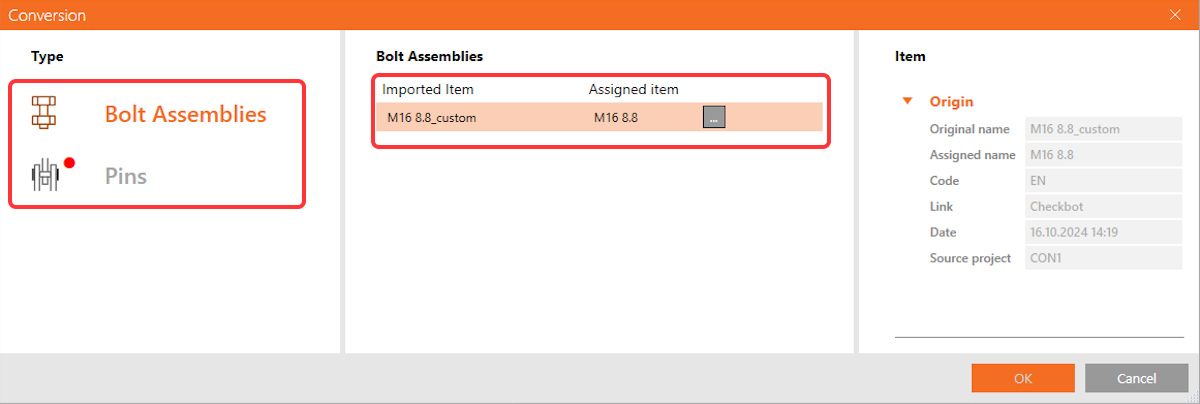
For export, both Bolt Assemblies and Pins are fully exported with all design information.

Download the latest version for free

Subscribe to our newsletter

Company

  • About us
  • Partnerships
  • Job openings
  • Patented technology for structural engineers

Resources

  • Customer projects
  • Case studies
  • IDEA StatiCa Connection Library
  • Concrete verifications

Legal

  • IDEA StatiCa END USER LICENSE AGREEMENT
  • Privacy policy
  • Terms of Services – IDEA StatiCa Viewer
  • Licensing

Help

  • Contact
  • Get price quote
  • IDEA StatiCa Specialists
  • Download the latest version
FacebookInstagramLinkedInYouTube

© IDEA StatiCa 2009-2026

Trusted and used worldwide by engineers, fabricators & consultants.