


The ability to link IDEA StatiCa apps to dozens of different tools brings the need to create different approaches for specific vendors. The BIM link data transfer is polished and simplified to make the processes as smooth and quick as possible.
Thanks to this, the time needed for getting the data from different sources is short. Here are some comparisons for different metrics.
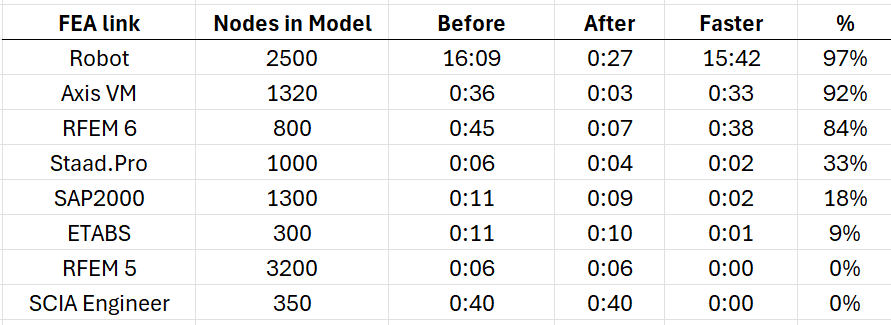
Faster imports for single connection from FEA links
We improved processes during the import of a single connection and member in FEA imports by reducing unnecessary API calls we use during import. This results in significantly faster import times for specific BIM links.
Faster opening of the existing projects
Also, the opening times for Checkbot's already existing projects has been improved by approximately 50% compared to version 23.1.5.

Faster FEA imports by 60%
The import speed has been improved by delaying connection creation (.ideacon) till the point where they are really needed. Import speedup varies from FEA link to FEA link.
During import, we skipped the part where all imported connections were written down to the hard drive in the Connections folder in the Checkbot project since it took the majority of import time. Starting from version 24.0.2 the Ideacon files are created at the moment when the user wants to interact with them:
- Design connections in IDEA StatiCa Connection
- Export connections to Viewer or to Ideaconn files from Checkbot
- Design connections in the Member application
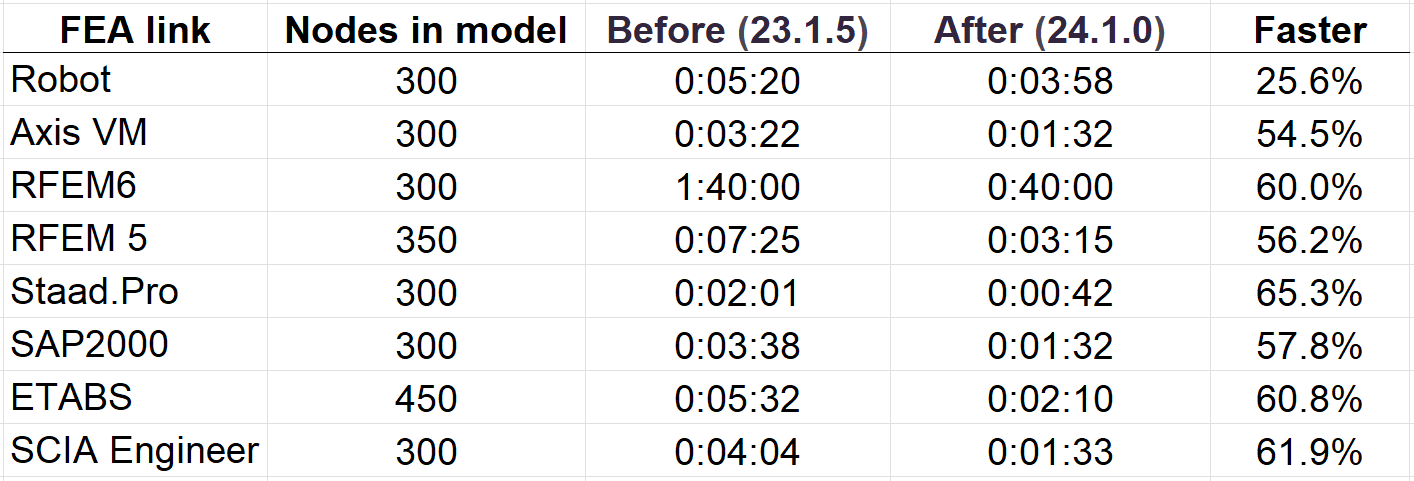
Generating a subset of Ideacons only when necessary significantly reduces the time involved compared to creating hundreds of files during the import process. This approach accelerates, especially, the import of large models, allowing users to experience quicker performance and a more efficient workflow within IDEA StatiCa Checkbot.