Idea Statica
Steel
Steel overview
Connection design
Member design
Parametric design
Steel case studies
Concrete
Concrete overview
Walls and D-regions
Anchoring design
Concrete case studies
BIM & Workflows
BIM Overview
Supported integrations
Checkbot
Viewer
APIs
Support & Learning
Support Center
E-learning & certification
Blog
Downloads & Licensing
Pricing
Plans
Free community tool
Enterprise customers
Students & educators
How much will you save?
Company
About us
Contact
Research & development
Authorized resellers
Meet our customers
14-Day Trial
Support CenterKnowledge BaseLoad effects displayed in the scene
Load effects displayed in the scene
SteelConnection designKnowledge basev25.0Load effects

Load effects displayed in the scene

This article is also available in
ENCSDEESFRITPTNLHURO

To assist when reviewing the results, the calculated load effects are displayed in the scene in the Check tab. This helps engineers select the results for a particular calculated load effect.

When more than one load effect is used, users can check what effect every single load effect in the structure has in the results. This can help users to understand the overall results that are presented. 

For easier orientation, all calculated load effects are shown directly in the tree in the scene under the Check tab, so users can quickly choose the load effect and check the results for the selected one.
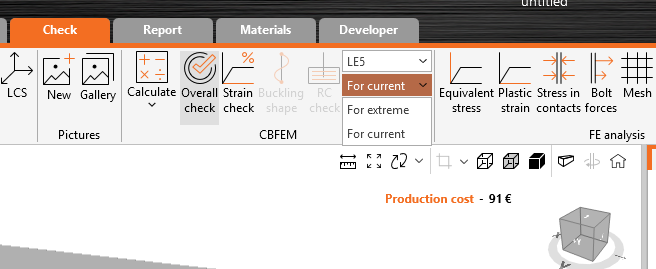
Load effects displayed in the scene

The calculated load effects are available directly in the tree in the 3D scene. Disabled load effects in the Design tab are not shown in the Check tab tree.

When the main Load effects header (or the Stress, strain item under) is selected, the results show a mix of all load effects, while for each connection part, there can be a different critical load effect. These results are shown:

  • in brief results
  • in the scene (stress maps)
  • in the check tables
Load effects displayed in the scene

When a specific load effect is selected, results for this load only are shown everywhere – in the result overview, in the scene, and in tables.
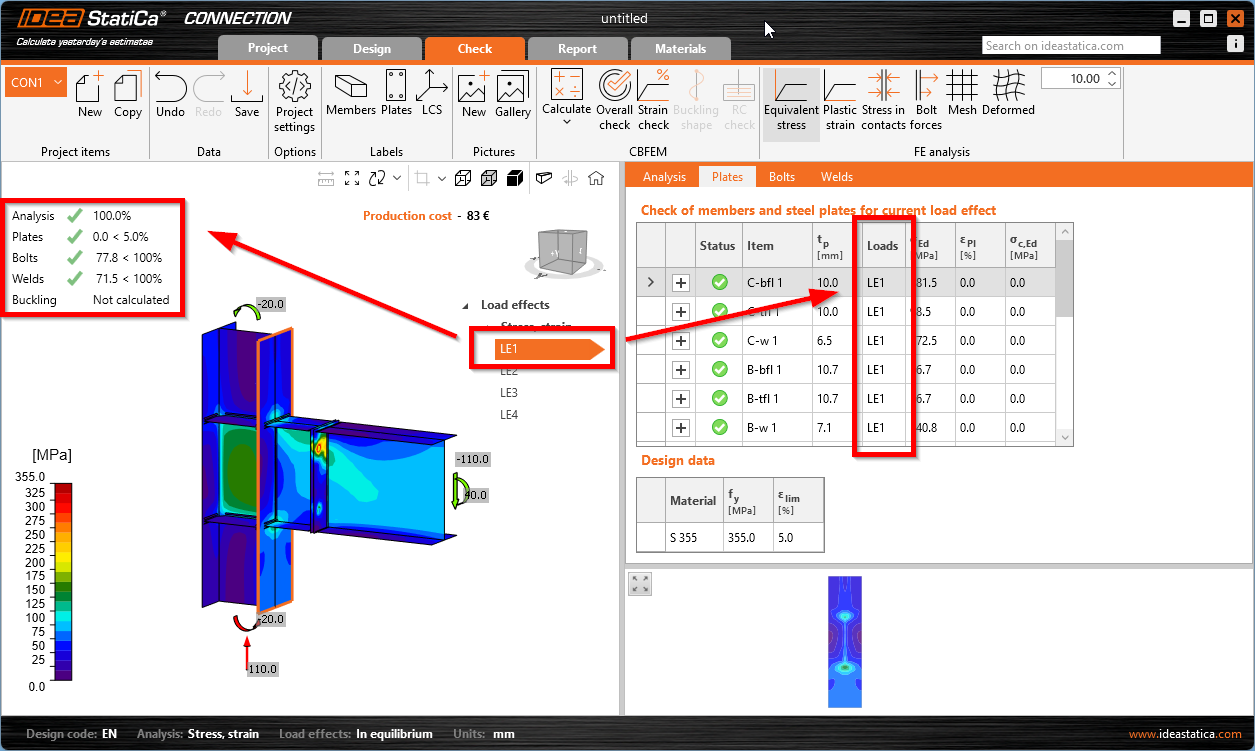
Load effects displayed in the scene
Check out IDEA StatiCa for free

Subscribe to our newsletter

Company

  • About us
  • Partnerships
  • Job openings
  • Patented technology for structural engineers

Resources

  • Customer projects
  • Case studies
  • IDEA StatiCa Connection Library
  • Concrete verifications

Legal

  • IDEA StatiCa END USER LICENSE AGREEMENT
  • Privacy policy
  • Terms of Services – IDEA StatiCa Viewer
  • Licensing

Help

  • Contact
  • Get price quote
  • IDEA StatiCa Specialists
  • Download the latest version
FacebookInstagramLinkedInYouTube

© IDEA StatiCa 2009-2026

Trusted and used worldwide by engineers, fabricators & consultants.