Idea Statica
Steel
Concrete
BIM & Workflows
Support & Learning
Pricing
Company
14-Day Trial
Support CenterKnowledge BaseNumber of buckling modes
Number of buckling modes
SteelConnection designKnowledge baseConnectionAISC (USA)

Number of buckling modes

This article is also available in
ENCSDE

Before version 21.1, the number of calculated and displayed buckling modes was set to six, which, in some cases, was not enough. When investigating the complex members or class 4 cross-sections, this fixed value had placed a restriction on the engineers' ability to complete their checks.

From version 21.1 onwards there is the possibility to change the number of modes (shapes and critical factors) evaluated in the linear buckling analysis (LBA): the value can be changed in Code setup in the range of 3–30, the default settings remain on 6. The number of buckling modes can be customized in both, IDEA StatiCa Connection and IDEA StatiCa Member applications.
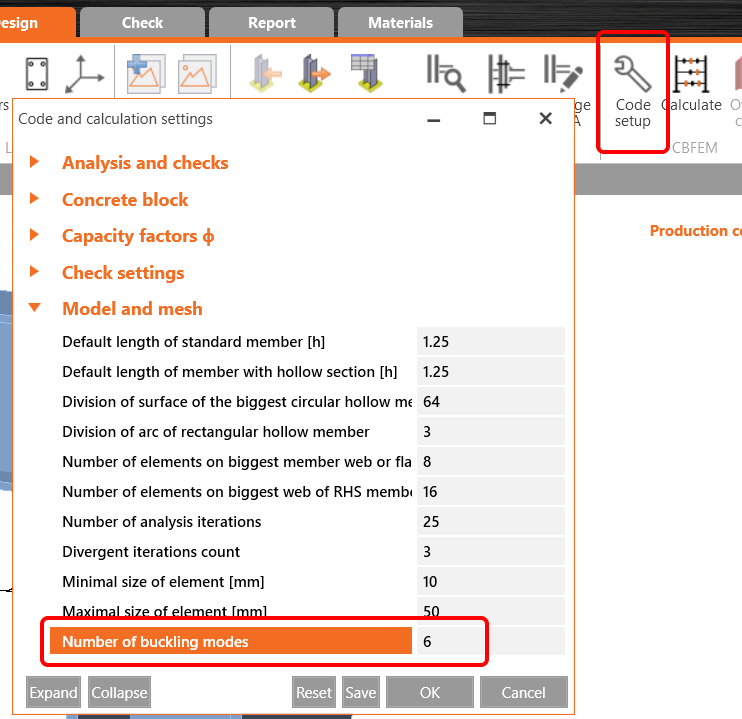
Number of buckling modes

Available in the Enhanced edition of IDEA StatiCa Steel.

Subscribe to our newsletter

Company

  • About us
  • Partnerships
  • Job openings
  • Patented technology for structural engineers

Resources

  • Customer projects
  • Case studies
  • IDEA StatiCa Connection Library
  • Concrete verifications

Legal

  • IDEA StatiCa END USER LICENSE AGREEMENT
  • Privacy policy
  • Terms of Services – IDEA StatiCa Viewer
  • Licensing

Help

  • Contact
  • Get price quote
  • IDEA StatiCa Specialists
  • Download the latest version
FacebookInstagramLinkedInYouTube

© IDEA StatiCa 2009-2026

Trusted and used worldwide by engineers, fabricators & consultants.