Idea Statica
  • Steel
  • Concrete
  • BIM & workflows
  • Support & Learning
  • Pricing
  • Company
  • Steel overview
  • Connection design
  • Member design
  • Parametric design
  • Steel case studies
  • Concrete overview
  • Walls and D-regions
  • Anchoring design
  • Members & cross-sections
  • Concrete case studies
  • BIM overview
  • Supported integrations
  • Checkbot
  • Viewer
  • APIs
  • Support Center
  • E-learning & certification
  • Blog
  • Downloads & Licensing
  • Plans
  • Free community tool
  • Enterprise customers
  • Students & educators
  • How much will you save?
  • About us
  • Contact
  • Research & development
  • Authorized resellers
  • Meet our customers
  • Career
  • Steel
    Steel overviewConnection designMember designParametric designSteel case studies
  • Concrete
    Concrete overviewWalls and D-regionsAnchoring designMembers & cross-sectionsConcrete case studies
  • BIM & workflows
    BIM overviewSupported integrationsCheckbotViewerAPIs
  • Support & Learning
    Support CenterE-learning & certificationBlogDownloads & Licensing
  • Pricing
    PlansFree community toolEnterprise customersStudents & educatorsHow much will you save?
  • Company
    About usContactResearch & developmentAuthorized resellersMeet our customersCareer
14-Day Trial
14-Day Trial
  • Steel
  • Concrete
  • BIM & workflows
  • Support & Learning
  • Pricing
  • Company

Subscribe to our newsletter

Company

  • About us
  • Partners
  • Careers
  • Patent

Resources

  • Customer projects
  • Case studies
  • Connection Library
  • Verification books

Legal

  • EULA
  • Global privacy policy
  • California Privacy
  • TOS Viewer
  • Licensing

Help

  • Contact
  • Quote request
  • Resellers
  • Downloads
FacebookInstagramLinkedInYouTube

© IDEA StatiCa 2009-2026

Trusted and used worldwide by engineers, fabricators & consultants.

Support CenterKnowledge Base ArticlesTroubleshooting BIM link RFEM6/RSTAB9 (gRPC)
IDEA StatiCa BIM interoperability for steel
IDEA StatiCa BIM interoperability for concrete
BIM links: Supported versions of 3rd party applications
How to run old versions of BIM links
BIM link with RFEM 6 and RSTAB 9
Known limitations for RFEM/RSTAB
Troubleshooting BIM link RFEM6/RSTAB9 (gRPC)
RISA-3D
SteelConnection designMember designKnowledge baseCheckbot

Troubleshooting BIM link RFEM6/RSTAB9 (gRPC)

This article is also available in
ENCZDEESFRITPTNLHUROKRPLTHTRVIZH

This guide provides a targeted troubleshooting framework for resolving common errors during the BIM link process between Dlubal RFEM 6 / RSTAB 9 and IDEA StatiCa based on Dlubal API.

1) Check RFEM6/RSTAB9 version

 This BIM link based on Dlubal API works only with version 6.14/9.14 or later.

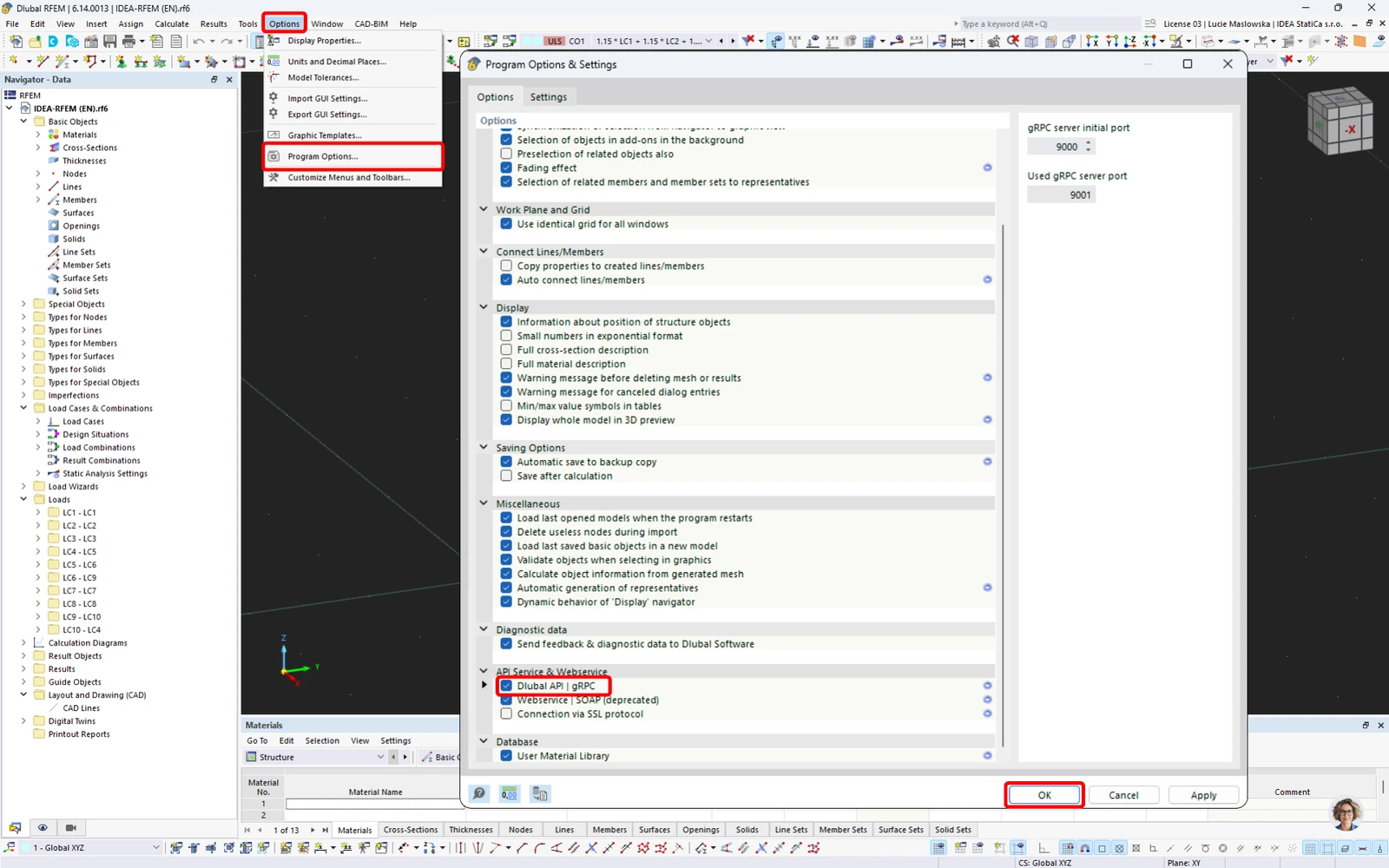
2) Make sure the Dlubal API gRPC is activated in Program options
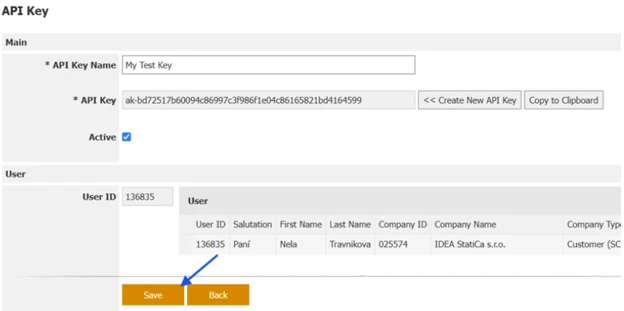
3) Make sure the API Key is saved 

If the user generates a new API key and copies it without saving it, the following error occurs:
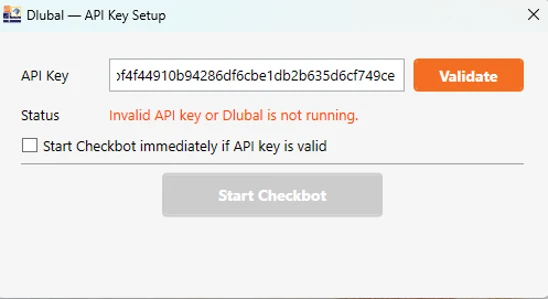
The API key must be saved first, otherwise, it is not valid. 
4) Check that  RFEM6/RSTAB9 application is open 

If the user runs the IDEA StatiCa 26.0 for RFEM 6 (gRPC) application without launching RFEM/RSTAB, the following error appears. The application must be running with an open and saved project. 
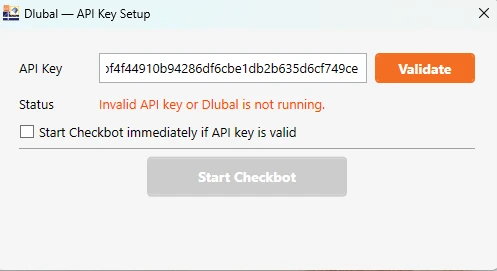
5) API Key can not be validated after repeated start of the BIM link

If the Checkbot can not be started with the Status message "Invalid API key or Dlubal is not running." and the Details message "gRPC Connection error: ResourceExhausted - Another client is already connected to the server", the timeout of the previous session might still be preventing a new session from being started. 
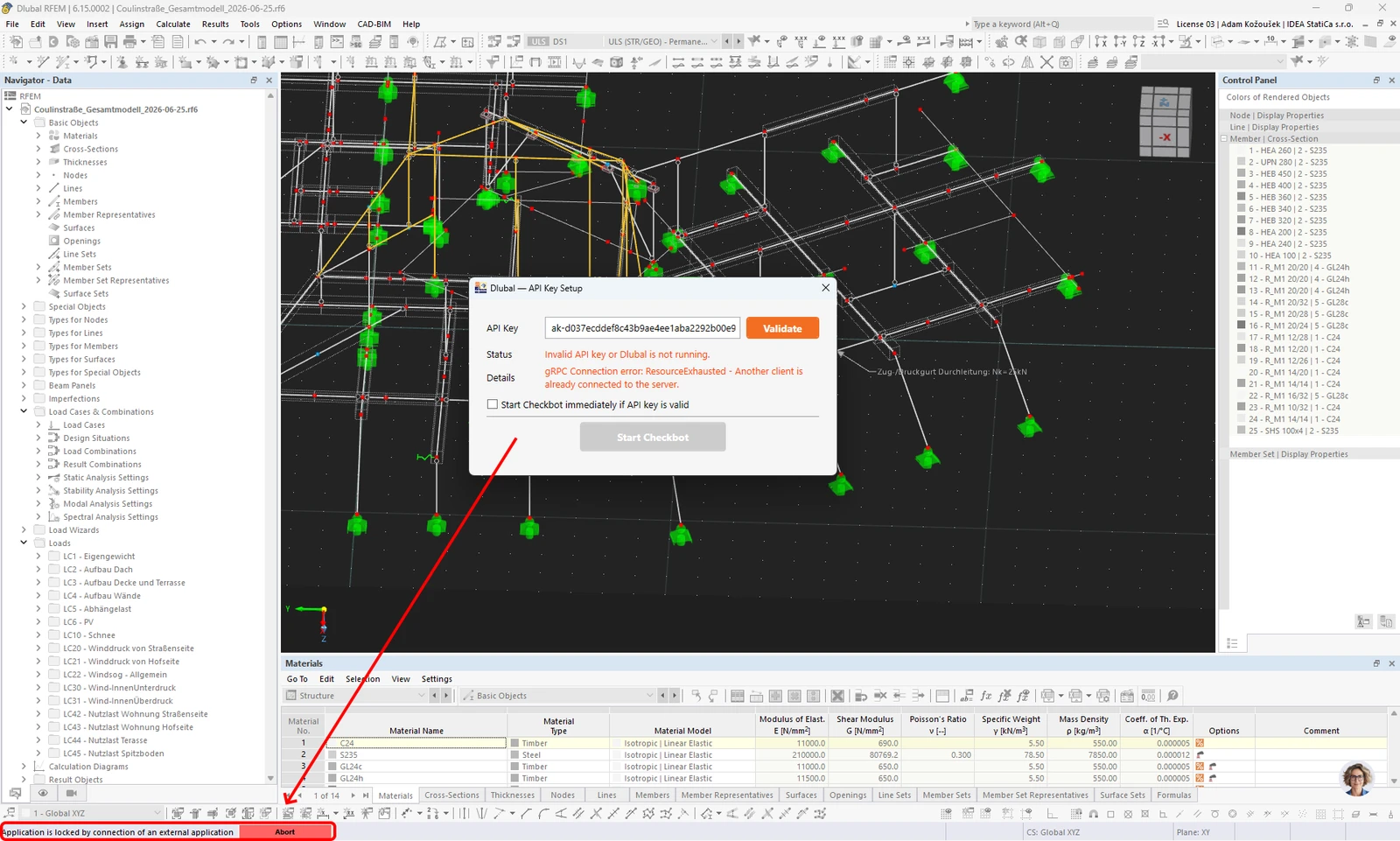
The time out is set for about 10 seconds; you can see the status in the bottom left corner of the RFEM window, and you can wait for the time out to finish the previous session or stop it by clicking the Abort button and then Validate your API Key and Start Checkbot.

6) Deactivate and activate again the Dlubal API-Key 

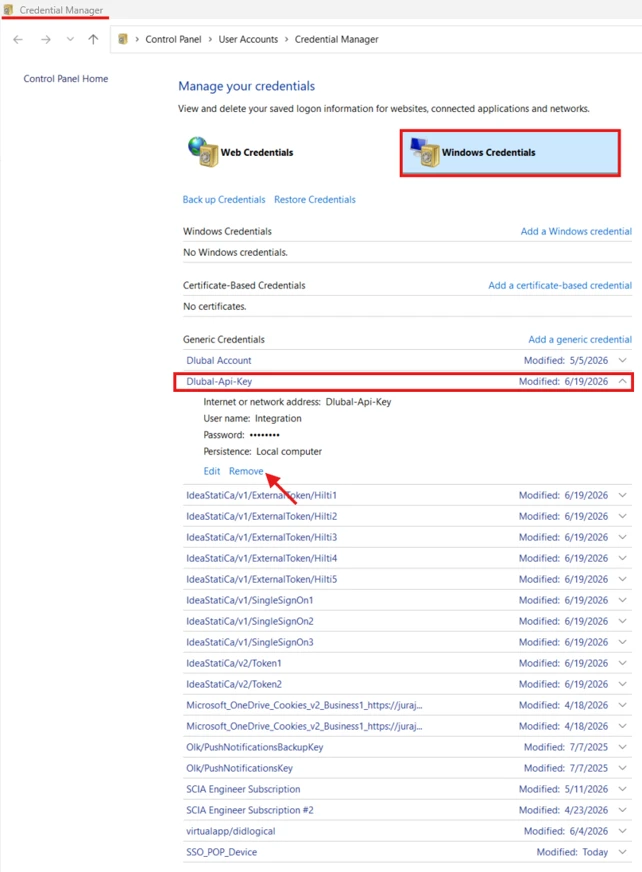
If the Dlubal - API Key Setup for any reason refuses to validate a valid API key, even after restarting the Dlubal application and system, removing the API key from the system credentials might resolve the problem.

Dlubal API Key credentials can be removed through the Windows Credential Manager.