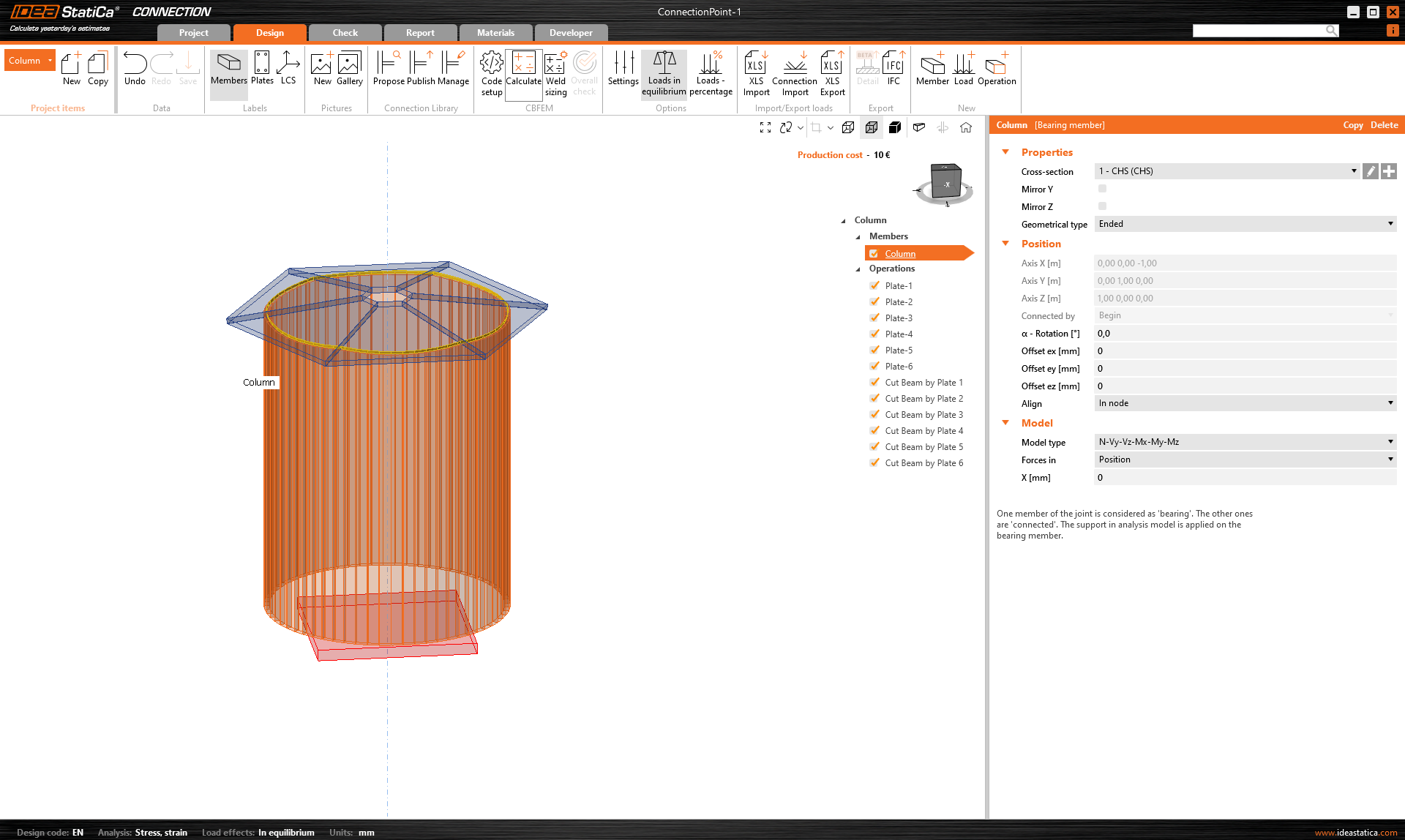
It is sometimes necessary to use plates with unusual shapes arbitrarily rotated in space in complex joints. It comes mainly with the scheme of the joint created in 3rd party software. In such a case, the following tutorial can help you understand how to import the data into IDEA StatiCa Connection.
Widget #NaN: support_center_article
Name: Grasshopper - Plugin Installation
ID: 6d5f0dc8-ee5a-4c50-aced-df94e3586763
Show Raw Data
{
"title": {
"name": "Main headline (H1)",
"type": "text",
"value": "Grasshopper - Plugin Installation"
},
"preview_image": {
"name": "Preview image",
"type": "asset",
"value": [
{
"name": "E1-1.png",
"description": null,
"type": "image/png",
"size": 68369,
"url": "https://assets-us-01.kc-usercontent.com:443/28eac049-c8ed-00e2-220c-12142a968dff/fe255e56-8a4e-4dd5-8264-4c71f1dcb040/E1-1.png",
"width": 782,
"height": 692,
"renditions": {}
}
]
},
"post_date": {
"name": "Post date",
"type": "date_time",
"value": null,
"displayTimeZone": "Europe/Prague"
},
"perex_content": {
"name": "Lead paragraph",
"type": "text",
"value": ""
},
"content": {
"images": [
{
"description": null,
"imageId": "210c0a21-6b2e-4cf8-96ca-37e82d4862fa",
"url": "https://assets-us-01.kc-usercontent.com:443/28eac049-c8ed-00e2-220c-12142a968dff/79496c31-039f-4837-b79c-cb4138788fee/g-1.png",
"height": 602,
"width": 822
},
{
"description": null,
"imageId": "17b9256a-6aa1-42b7-8631-d3e7d4e045fa",
"url": "https://assets-us-01.kc-usercontent.com:443/28eac049-c8ed-00e2-220c-12142a968dff/af466a09-7c9d-43da-aa86-ae8cf2e05680/g-2.png",
"height": 265,
"width": 492
},
{
"description": null,
"imageId": "2a7f156a-11b3-4615-bfa5-c5e91e966443",
"url": "https://assets-us-01.kc-usercontent.com:443/28eac049-c8ed-00e2-220c-12142a968dff/992a6362-f26a-4ba4-9082-0da7868c65c5/E1-1.png",
"height": 692,
"width": 782
},
{
"description": null,
"imageId": "b957b01f-e69c-482c-841e-87a2cab6aca6",
"url": "https://assets-us-01.kc-usercontent.com:443/28eac049-c8ed-00e2-220c-12142a968dff/71249ebe-9e05-4c66-bf72-1b3714c9decf/g-4.png",
"height": 599,
"width": 1077
},
{
"description": null,
"imageId": "8e7e6c80-c3e3-4d20-8aab-7481515ddf8d",
"url": "https://assets-us-01.kc-usercontent.com:443/28eac049-c8ed-00e2-220c-12142a968dff/f0c189a8-203f-40ea-9248-7aaf4be667ec/grasshopper-idea.png",
"height": 161,
"width": 814
}
],
"linkedItemCodenames": [],
"linkedItems": [],
"links": [
{
"codename": "grasshopper___introduction_to_the_plugin_component",
"linkId": "f2f373ad-9a22-499b-aced-f9520c80a37a",
"urlSlug": "description-of-grasshopper-plugin-components",
"type": "support_center_article"
}
],
"name": "Content",
"type": "rich_text",
"value": "<p>You can get a trial version of Rhino3d and Grasshopper from the <a href=\"https://www.rhino3d.com/download/\" data-new-window=\"true\" target=\"_blank\" rel=\"noopener noreferrer\">Rhino3d</a> website. Run Rhinoceros and select the template with <strong>Meters</strong>:</p>\n<figure data-asset-id=\"210c0a21-6b2e-4cf8-96ca-37e82d4862fa\" data-image-id=\"210c0a21-6b2e-4cf8-96ca-37e82d4862fa\"><img src=\"https://assets-us-01.kc-usercontent.com:443/28eac049-c8ed-00e2-220c-12142a968dff/79496c31-039f-4837-b79c-cb4138788fee/g-1.png\" data-asset-id=\"210c0a21-6b2e-4cf8-96ca-37e82d4862fa\" data-image-id=\"210c0a21-6b2e-4cf8-96ca-37e82d4862fa\" alt=\"\"></figure>\n<p>In the Command line, please enter \"<strong>Package Manager</strong>\":</p>\n<figure data-asset-id=\"17b9256a-6aa1-42b7-8631-d3e7d4e045fa\" data-image-id=\"17b9256a-6aa1-42b7-8631-d3e7d4e045fa\"><img src=\"https://assets-us-01.kc-usercontent.com:443/28eac049-c8ed-00e2-220c-12142a968dff/af466a09-7c9d-43da-aa86-ae8cf2e05680/g-2.png\" data-asset-id=\"17b9256a-6aa1-42b7-8631-d3e7d4e045fa\" data-image-id=\"17b9256a-6aa1-42b7-8631-d3e7d4e045fa\" alt=\"\"></figure>\n<p>A new window appears; select IDEAStatiCa and click <strong>Install</strong>. The plugin will be downloaded and installed. To become active, a restart of Rhinoceros is necessary.</p>\n<figure data-asset-id=\"2a7f156a-11b3-4615-bfa5-c5e91e966443\" data-image-id=\"2a7f156a-11b3-4615-bfa5-c5e91e966443\"><img src=\"https://assets-us-01.kc-usercontent.com:443/28eac049-c8ed-00e2-220c-12142a968dff/992a6362-f26a-4ba4-9082-0da7868c65c5/E1-1.png\" data-asset-id=\"2a7f156a-11b3-4615-bfa5-c5e91e966443\" data-image-id=\"2a7f156a-11b3-4615-bfa5-c5e91e966443\" alt=\"\"></figure>\n<p> To start Grasshopper with the IDEA StatiCa plugin, select <strong>Tools / Grasshopper </strong>in the Rhihoceros tab.</p>\n<figure data-asset-id=\"b957b01f-e69c-482c-841e-87a2cab6aca6\" data-image-id=\"b957b01f-e69c-482c-841e-87a2cab6aca6\"><img src=\"https://assets-us-01.kc-usercontent.com:443/28eac049-c8ed-00e2-220c-12142a968dff/71249ebe-9e05-4c66-bf72-1b3714c9decf/g-4.png\" data-asset-id=\"b957b01f-e69c-482c-841e-87a2cab6aca6\" data-image-id=\"b957b01f-e69c-482c-841e-87a2cab6aca6\" alt=\"\"></figure>\n<p>As you can see, the plugin is already incorporated.</p>\n<figure data-asset-id=\"8e7e6c80-c3e3-4d20-8aab-7481515ddf8d\" data-image-id=\"8e7e6c80-c3e3-4d20-8aab-7481515ddf8d\"><img src=\"https://assets-us-01.kc-usercontent.com:443/28eac049-c8ed-00e2-220c-12142a968dff/f0c189a8-203f-40ea-9248-7aaf4be667ec/grasshopper-idea.png\" data-asset-id=\"8e7e6c80-c3e3-4d20-8aab-7481515ddf8d\" data-image-id=\"8e7e6c80-c3e3-4d20-8aab-7481515ddf8d\" alt=\"\"></figure>\n<p>Learn about the components and commands in the IDEA StatiCa plugin for Grasshopper in the article <a data-item-id=\"f2f373ad-9a22-499b-aced-f9520c80a37a\" href=\"\">Description of Grasshopper plugin components</a>.</p>"
},
"regions": {
"name": "Region",
"type": "taxonomy",
"value": [
{
"name": "AMER",
"codename": "amer"
},
{
"name": "EMEA",
"codename": "emea"
},
{
"name": "APAC",
"codename": "apac"
}
],
"taxonomyGroup": "region"
},
"product_groups": {
"name": "Product group",
"type": "taxonomy",
"value": [
{
"name": "Steel",
"codename": "steel"
},
{
"name": "Connection design",
"codename": "connection_design"
}
],
"taxonomyGroup": "product_group"
},
"support_center_article_types": {
"name": "Support center article",
"type": "taxonomy",
"value": [
{
"name": "Tutorials",
"codename": "tutorial"
}
],
"taxonomyGroup": "support_center_article"
},
"expertise_levels": {
"name": "Expertise level",
"type": "taxonomy",
"value": [
{
"name": "Intermediate",
"codename": "intermediate"
},
{
"name": "Expert",
"codename": "expert"
}
],
"taxonomyGroup": "expertise_level"
},
"labels": {
"name": "Labels",
"type": "taxonomy",
"value": [
{
"name": "IDEA Open Model (API)",
"codename": "idea_open_model__api_"
},
{
"name": "Connection",
"codename": "connection"
}
],
"taxonomyGroup": "labels"
},
"linked_items": {
"name": "Linked items",
"type": "modular_content",
"value": [],
"linkedItems": []
},
"attachments__files": {
"name": "Attachments",
"type": "asset",
"value": []
},
"content_priority__value": {
"name": "Content priority value",
"type": "number",
"value": null
},
"options": {
"name": "Options",
"type": "multiple_choice",
"value": []
},
"url_slug": {
"name": "Url slug",
"type": "url_slug",
"value": "grasshopper-plugin-installation"
},
"unique_url_slug": {
"name": "Unique URL slug",
"type": "custom",
"value": "[\"grasshopper-plugin-installation\",\"[autogenerated]\"]"
},
"content_settings__sitemap": {
"name": "Show in sitemap",
"type": "multiple_choice",
"value": []
},
"content_settings__robots": {
"name": "Search engine indexing",
"type": "multiple_choice",
"value": []
},
"content_settings__is_hidden": {
"name": "Hidden nested content",
"type": "multiple_choice",
"value": []
},
"content_settings__is_topped": {
"name": "Topped",
"type": "multiple_choice",
"value": []
},
"metadata__page_title": {
"name": "Page title",
"type": "text",
"value": ""
},
"metadata__page_description": {
"name": "Page description",
"type": "text",
"value": ""
},
"metadata__page_keywords": {
"name": "Page keywords",
"type": "text",
"value": ""
},
"metadata__canonical_url": {
"name": "Canonical URL",
"type": "text",
"value": ""
},
"metadata__og_title": {
"name": "OG:title",
"type": "text",
"value": ""
},
"metadata__og_description": {
"name": "OG:description",
"type": "text",
"value": ""
},
"metadata__og_image": {
"name": "OG:image",
"type": "asset",
"value": []
},
"translation__translation_connector": {
"name": "Translation Connector",
"type": "taxonomy",
"value": [],
"taxonomyGroup": "languages"
},
"translation__force_translation": {
"name": "Force translation",
"type": "multiple_choice",
"value": []
},
"translation__last_translation": {
"images": [],
"linkedItemCodenames": [],
"linkedItems": [],
"links": [],
"name": "Last translation",
"type": "rich_text",
"value": "<p><br></p>"
},
"translation__ai_translated": {
"name": "AI translated",
"type": "multiple_choice",
"value": []
},
"page_tree_settings__page_label": {
"name": "Page label",
"type": "text",
"value": ""
},
"page_tree_settings__path_segment": {
"name": "Path segment",
"type": "text",
"value": ""
},
"page_tree_settings__breadcrumb_style": {
"name": "Breadcrumb style",
"type": "multiple_choice",
"value": []
},
"page_tree_settings__hide_in_breadcrumbs": {
"name": "Hide in breadcrumbs",
"type": "multiple_choice",
"value": []
}
}Rhino model
Open the attached 3dm file, which contains a column with plates. This model was created directly in Rhinoceros. All elements must be defined by their median plane or centerline axis. The thickness or shape will be determined later in Grasshopper.
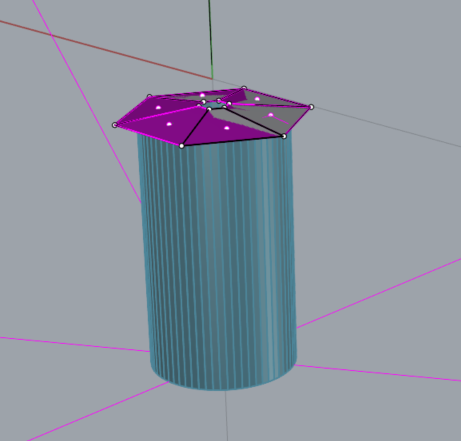
Now you can start Grasshopper.
Import of the plates into Grasshopper
For the import of a plate, you need to add these components:
Surface / Analysis / Deconstruct Brep
Surface / Freeform / Boundary Surfaces
IDEA StatiCa / Open Model Create / Create Plate(IOM)
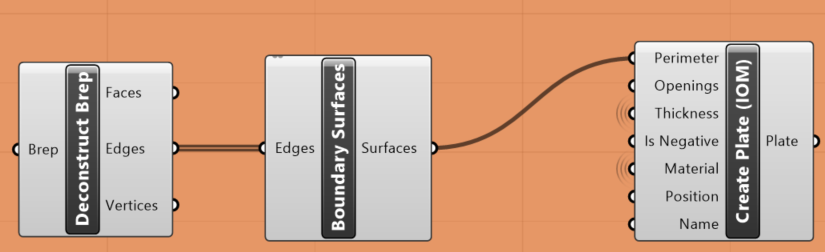
This has to be placed six times, as we have in this example 6 plates.
Also, the material of the plates has to be defined. For this, use the following component:
IDEA StatiCa / Open Model Create / Material by Name (IOM)
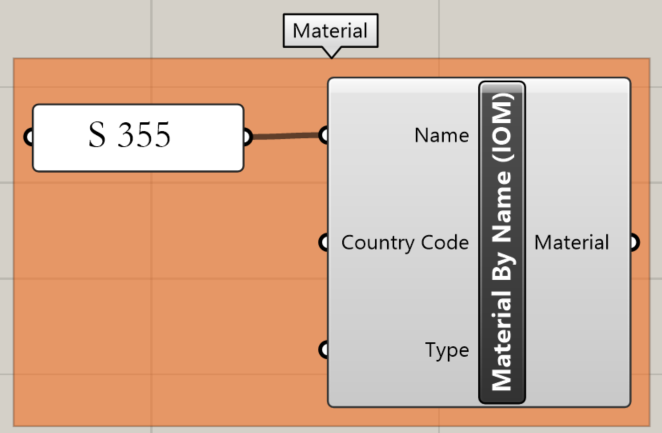
Import of the column into Grasshopper
Now we can define the cross-section of the column. We choose CHS 219,1/5, and the components needed to do so are following:
IDEA StatiCa / Open Model Create / Shape by Parameters (IOM)
IDEA StatiCa / Open Model Create / Create Cross-Section (IOM)
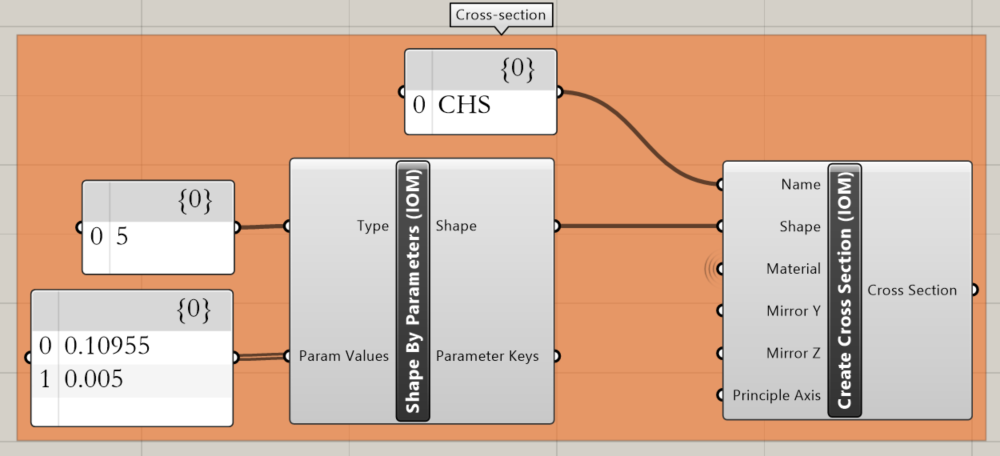
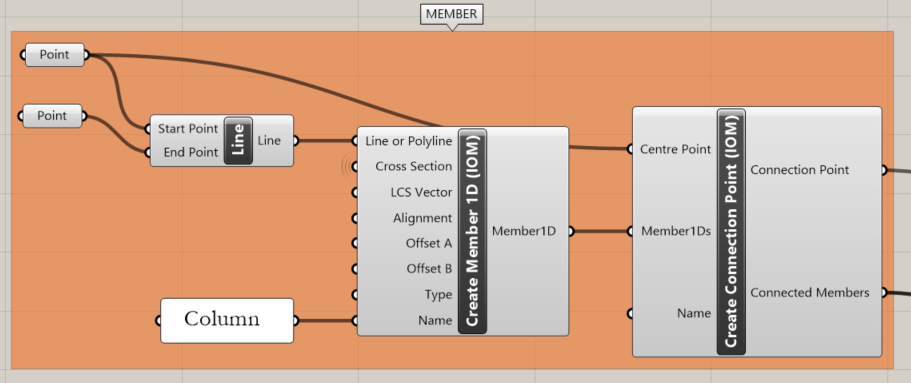
The next step is to create a member. For this, you have to take over from Rhino the ends of the centerline of the tube using the component Params / Geometry / Point.
Params / Geometry / Line
IDEA StatiCa / Open Model Create / Create Member 1D (IOM)
IDEA StatiCa / Open Model Create / Create Connection Point (IOM)
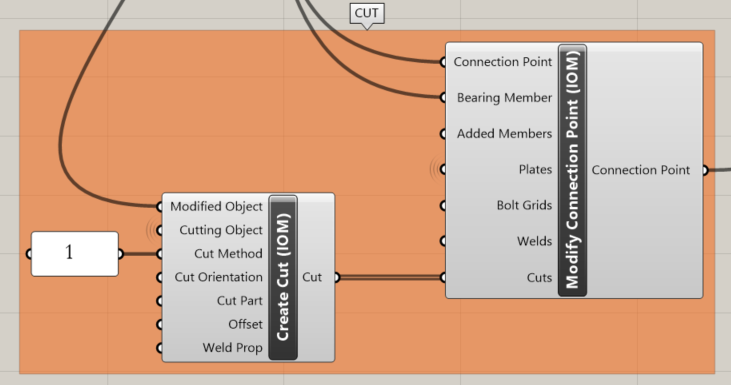
To trim the column using all the plates we use this components:
IDEA StatiCa / Open Model Create / Create Cut (IOM)
IDEA StatiCa / Open Model Create / Modify Connection Point (IOM)
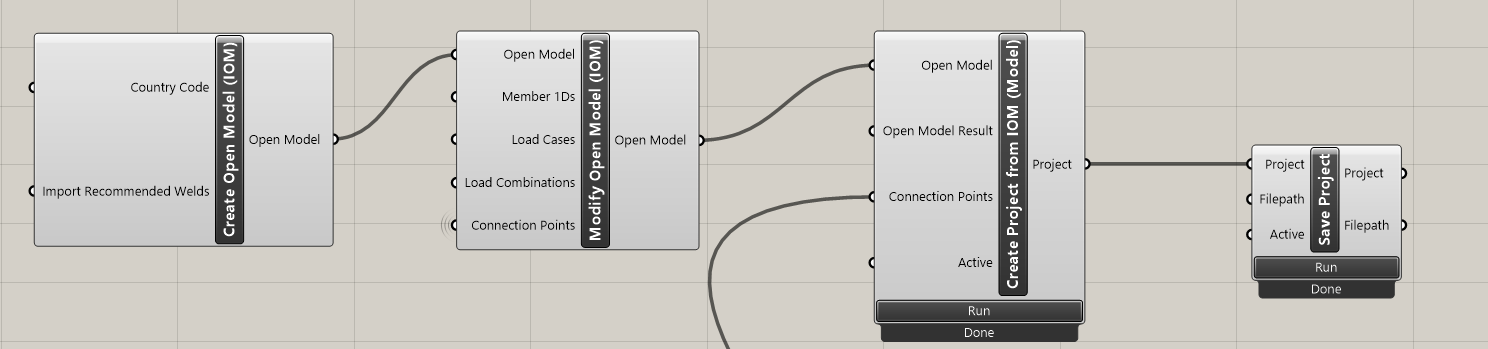
Creating an ideaCon file
The last step is creating the ideaCon file. For this, we need the following components:
IDEA StatiCa / Open Model / Create Open Model (IOM)
IDEA StatiCa / Open Model / Modify Open Model (IOM)
IDEA StatiCa / Connection / Create Connection from IOM
In the component File Path, you have to set the place where you want the file to be stored.
When you open the file, you get this result: