Idea Statica
Steel
Concrete
BIM & Workflows
Support & Learning
Pricing
Company
14-Day Trial
Support CenterKnowledge BaseCross-section searchbox
Cross-section library favorites
Cross-section searchbox
How to create and use a custom cross-section
Saving of user-defined cross-sections to MPRL
Limiting short lines in DXF imports
Regional-based item order in the cross-section library
Improved Cross-section Conversion
Searchbox in cross-section library
SteelConnection designKnowledge baseConnectionCross-sections

Cross-section searchbox

This article is also available in
ENCSDENL

As the library of cross-section (MPLR) is getting bigger, we have employed a new tool to make searching the desired section easier.

Since previous versions, you can set the specific class of cross-sections as favorite.

Now, you can use the search box within the library to find the desired section fast and easily. The search always works under the selected tab, i.e., if you are in Favorites, the search will go through your favorite sections only.

Together, it will speed up your work with cross-sections management.
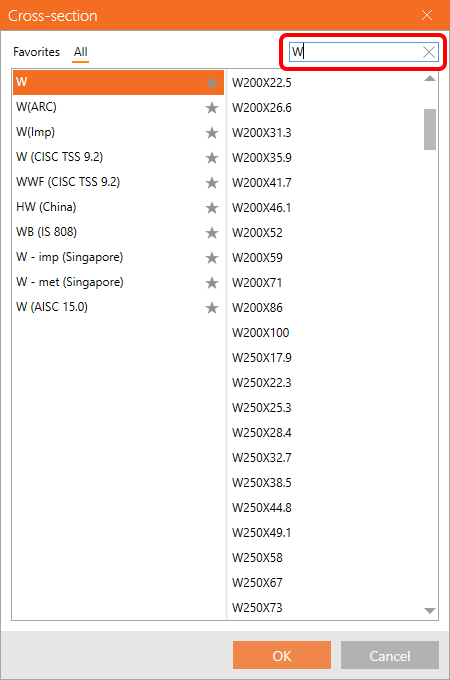
Searchbox in cross-section library

The feature has been possible to use in Connection, Member, and Checkbot since patch 22.1.5.

Available in both Expert and Enhanced editions of IDEA StatiCa Steel.

Download new version

Subscribe to our newsletter

Company

  • About us
  • Partnerships
  • Job openings
  • Patented technology for structural engineers

Resources

  • Customer projects
  • Case studies
  • IDEA StatiCa Connection Library
  • Concrete verifications

Legal

  • IDEA StatiCa END USER LICENSE AGREEMENT
  • Privacy policy
  • Terms of Services – IDEA StatiCa Viewer
  • Licensing

Help

  • Contact
  • Get price quote
  • IDEA StatiCa Specialists
  • Download the latest version
FacebookInstagramLinkedInYouTube

© IDEA StatiCa 2009-2026

Trusted and used worldwide by engineers, fabricators & consultants.