Idea Statica
Steel
Steel overview
Connection design
Member design
Parametric design
Steel case studies
Concrete
Concrete overview
Walls and D-regions
Anchoring design
Concrete case studies
BIM & Workflows
BIM Overview
Supported integrations
Checkbot
Viewer
APIs
Support & Learning
Support Center
E-learning & certification
Blog
Downloads & Licensing
Pricing
Plans
Free community tool
Enterprise customers
Students & educators
How much will you save?
Company
About us
Contact
Research & development
Authorized resellers
Meet our customers
14-Day Trial
Support CenterKnowledge BaseOff-line licensing
Licensing
What licensing system does IDEA StatiCa use?
Where to download installation files
Activating your user account
Setting up a commercial license
System requirements for IDEA StatiCa
Single Sign-on (SSO)
How to set which products I take from the license pool?
Do we have to do something special to open the traffic between the license server and our network?
How to add users who are assigned to another license?
Who is using the license?
New version indicator
Deploying IDEA StatiCa with Intune
Off-line licensing
Off-line licensing
LicensingKnowledge basev24.1Licensing

Off-line licensing

This article is also available in
ENCSDEESFRITPTNLHURO

This special licensing option is available for special contracts of Enterprise customers.

Enterprise users who are working for some reason in an offline mode (e.g. security regulations) have the option to request a special license type. Offline licensing is not part of the standard sales model but rather a feature to be used in exceptional cases when there is no other way to provide the product to the customer.

  • There is a new feature called 'Offline Activations' available for customers on the User Portal.
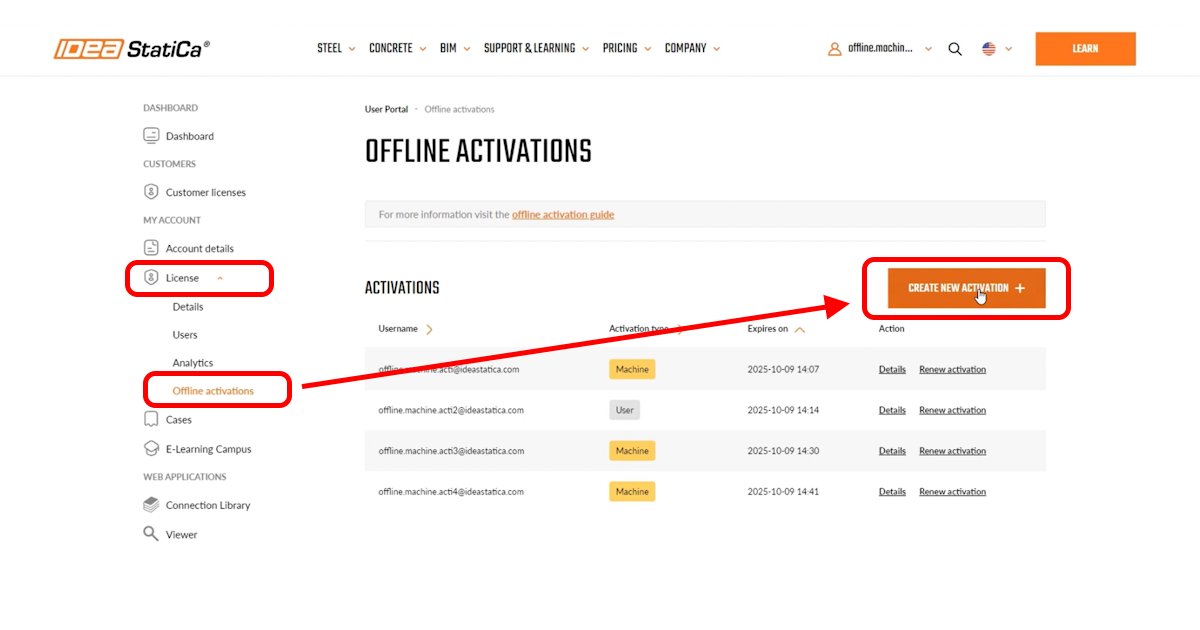
  • There are 2 modes of activation:
    1. On one hardware device, only one user account can be activated (default option for our customers)
    2. On one hardware device, there can be unlimited user accounts activated
  • This feature can be enabled in the IDEA StatiCa system ('Offline Activation mode' field on the License card (with values 'AccountActivation' (one user on one hardware) and 'MachineActivation').
  • The Offline activation page contains instructions for company admins on how to proceed with the activation.
  • The activation happens in two phases: 
    1. The client user launches the IDEA StatiCa application on the hardware where he wants to activate it, follows the instructions provided by the company admin, and provides the admin with his hardware footprint.
    2. After that, the admin comes to the Offline activation page on the User Portal and proceeds with the activation.
  • The activation key is valid for 365 days. When this period expires, the admin has another 14 days to reactivate the license key for a given user. During this time, the user can still use IDEA StatiCa software.

 Released in IDEA StatiCa version 24.1.

Download IDEA StatiCa 24.1

Subscribe to our newsletter

Company

  • About us
  • Partnerships
  • Job openings
  • Patented technology for structural engineers

Resources

  • Customer projects
  • Case studies
  • IDEA StatiCa Connection Library
  • Concrete verifications

Legal

  • IDEA StatiCa END USER LICENSE AGREEMENT
  • Privacy policy
  • Terms of Services – IDEA StatiCa Viewer
  • Licensing

Help

  • Contact
  • Get price quote
  • IDEA StatiCa Specialists
  • Download the latest version
FacebookInstagramLinkedInYouTube

© IDEA StatiCa 2009-2026

Trusted and used worldwide by engineers, fabricators & consultants.